
Shipping, explained
Free standard U.S. shipping. No minimum order. Estimated 5–8 business days total.
Shipping policy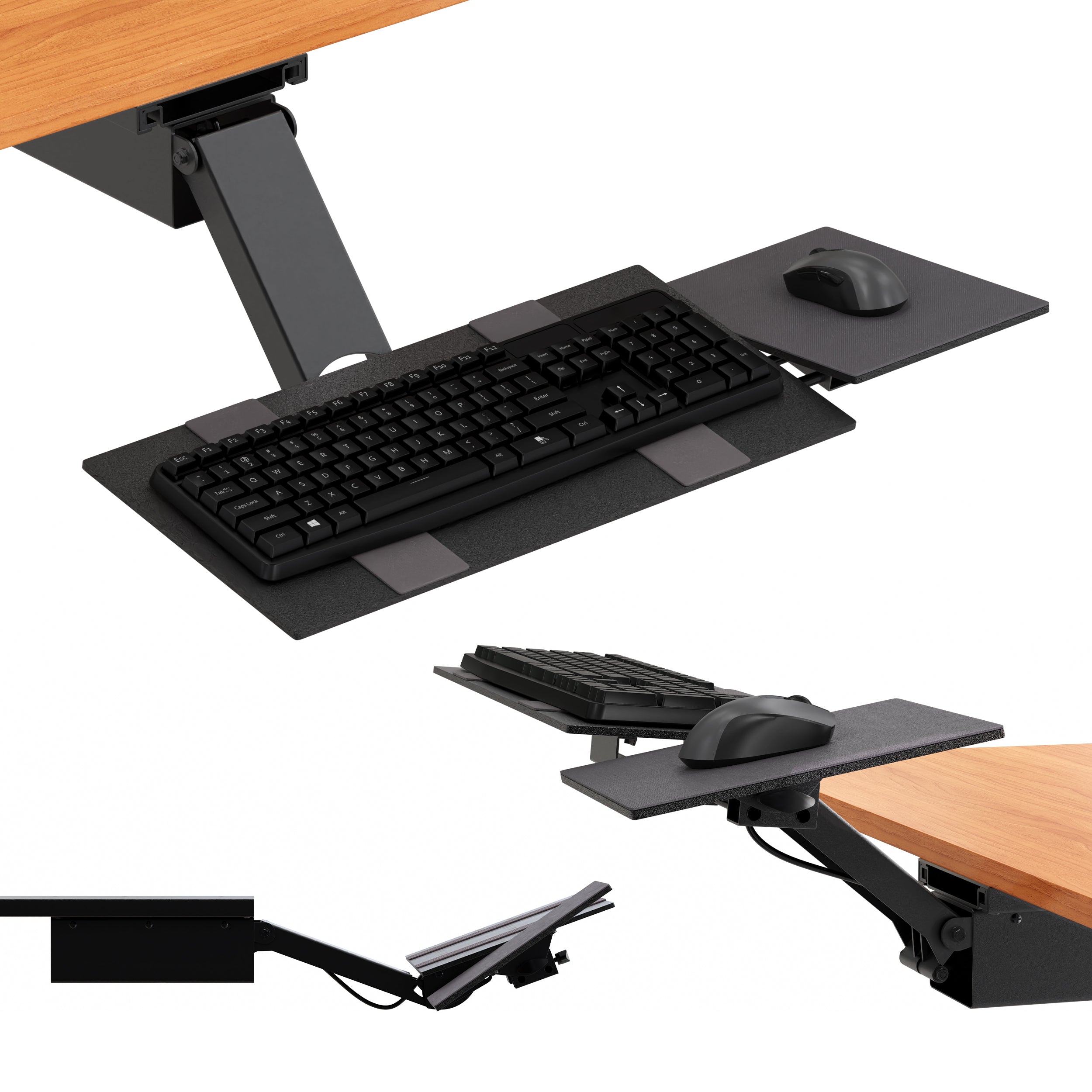
$70.00
A closer look
.kt2-pdp,
.kt2-pdp * {
box-sizing: border-box;
}
.kt2-pdp {
--ue-green: #00A934;
--ue-text: #1f1f1f;
--ue-muted: #666;
--ue-border: #e7e7e7;
--ue-soft: #f7f7f7;
color: var(--ue-text);
font-family: inherit;
}
.kt2-pdp img,
.kt2-pdp iframe {
display: block;
max-width: 100%;
}
.kt2-pdp img {
height: auto;
}
.kt2-wrap {
width: min(1200px, calc(100% - 40px));
margin: 0 auto;
}
.kt2-section {
padding: 48px 0;
}
.kt2-section + .kt2-section {
border-top: 1px solid var(--ue-border);
}
.kt2-section--soft {
background: var(--ue-soft);
}
.kt2-eyebrow {
margin: 0 0 10px;
color: var(--ue-green);
font-size: 13px;
font-weight: 700;
letter-spacing: .08em;
text-transform: uppercase;
}
.kt2-pdp h2,
.kt2-pdp h3 {
margin: 0;
color: var(--ue-text);
font-family: inherit;
text-transform: none;
}
.kt2-pdp h2 {
font-size: clamp(28px, 3vw, 36px);
line-height: 1.15;
font-weight: 700;
letter-spacing: -.02em;
}
.kt2-pdp h3 {
font-size: 20px;
line-height: 1.3;
font-weight: 700;
}
.kt2-pdp p,
.kt2-pdp li,
.kt2-pdp td,
.kt2-pdp th,
.kt2-pdp summary,
.kt2-pdp a {
font-size: 16px;
line-height: 1.6;
}
.kt2-lead {
margin: 16px 0 0;
color: var(--ue-muted);
max-width: 700px;
}
.kt2-grid-2 {
display: grid;
grid-template-columns: minmax(0, 1.05fr) minmax(0, .95fr);
gap: 48px;
place-items: center stretch;
}
.kt2-hero-media,
.kt2-feature-media {
overflow: hidden;
border-radius: 18px;
background: var(--ue-soft);
}
.kt2-hero-media img,
.kt2-feature-media img {
width: 100%;
}
.kt2-feature-grid {
display: grid;
grid-template-columns: repeat(5, minmax(0, 1fr));
gap: 14px;
margin-top: 30px;
}
.kt2-feature {
padding: 18px;
border: 1px solid var(--ue-border);
border-radius: 14px;
background: #fff;
}
.kt2-feature h3 {
margin-bottom: 6px;
}
.kt2-feature p {
margin: 0;
color: var(--ue-muted);
line-height: 1.5;
}
.kt2-number {
display: block;
margin-bottom: 9px;
color: var(--ue-green);
font-size: 27px;
line-height: 1;
font-weight: 700;
}
.kt2-feature-row {
display: grid;
grid-template-columns: minmax(0, 1fr) minmax(0, 1fr);
gap: 40px;
place-items: center stretch;
}
.kt2-feature-row + .kt2-feature-row {
margin-top: 42px;
}
.kt2-feature-row ul {
margin: 16px 0 0;
padding-left: 20px;
}
.kt2-feature-row li + li {
margin-top: 8px;
}
.kt2-table-wrap {
overflow-x: auto;
margin-top: 24px;
border: 1px solid var(--ue-border);
border-radius: 14px;
background: #fff;
}
.kt2-table {
width: 100%;
min-width: 520px;
border-collapse: collapse;
}
.kt2-table th,
.kt2-table td {
padding: 13px 16px;
border-bottom: 1px solid var(--ue-border);
}
.kt2-table tr:last-child th,
.kt2-table tr:last-child td {
border-bottom: 0;
}
.kt2-table th {
width: 36%;
background: #fafafa;
font-weight: 700;
}
.kt2-callout {
margin-top: 24px;
padding: 18px 20px;
border-left: 4px solid var(--ue-green);
background: #f4fbf6;
}
.kt2-callout p {
margin: 0;
}
.kt2-docs {
display: grid;
grid-template-columns: 1fr 1fr;
gap: 14px;
margin-top: 24px;
}
.kt2-doc {
display: block;
padding: 16px 18px;
border: 1px solid var(--ue-border);
border-radius: 12px;
background: #fff;
color: var(--ue-text);
text-decoration: none;
font-weight: 700;
}
.kt2-doc:hover {
border-color: var(--ue-green);
color: var(--ue-green);
}
.kt2-media-grid {
display: grid;
grid-template-columns: 1.2fr .8fr;
gap: 20px;
margin-top: 28px;
}
.kt2-video {
position: relative;
aspect-ratio: 16 / 9;
overflow: hidden;
border-radius: 16px;
background: #000;
}
.kt2-video iframe {
width: 100%;
height: 100%;
border: 0;
}
.kt2-gallery {
display: grid;
grid-template-columns: 1fr 1fr;
gap: 12px;
}
.kt2-gallery img {
width: 100%;
height: 100%;
min-height: 160px;
object-fit: cover;
border-radius: 12px;
background: var(--ue-soft);
}
.kt2-faq {
margin-top: 24px;
border-top: 1px solid var(--ue-border);
}
.kt2-faq details {
border-bottom: 1px solid var(--ue-border);
}
.kt2-faq summary {
position: relative;
padding: 18px 40px 18px 0;
cursor: pointer;
font-weight: 700;
list-style: none;
}
.kt2-faq summary::-webkit-details-marker {
display: none;
}
.kt2-faq summary::after {
content: "+";
position: absolute;
right: 4px;
top: 15px;
color: var(--ue-green);
font-size: 24px;
font-weight: 500;
}
.kt2-faq details[open] summary::after {
content: "−";
}
.kt2-faq details div {
padding: 0 0 18px;
color: var(--ue-muted);
}
.kt2-faq details p {
margin: 0;
}
@media (max-width: 1050px) {
.kt2-feature-grid {
grid-template-columns: repeat(3, minmax(0, 1fr));
}
}
@media (max-width: 900px) {
.kt2-section {
padding: 40px 0;
}
.kt2-grid-2,
.kt2-feature-row,
.kt2-media-grid {
grid-template-columns: 1fr;
gap: 28px;
}
.kt2-feature-grid,
.kt2-docs {
grid-template-columns: 1fr 1fr;
}
.kt2-gallery img {
min-height: 180px;
}
}
@media (max-width: 600px) {
.kt2-wrap {
width: min(100% - 28px, 1200px);
}
.kt2-section {
padding: 32px 0;
}
.kt2-feature-grid,
.kt2-docs,
.kt2-gallery {
grid-template-columns: 1fr;
}
.kt2-feature {
padding: 17px;
}
.kt2-gallery img {
min-height: 0;
aspect-ratio: 4 / 3;
}
.kt2-table th,
.kt2-table td {
padding: 12px 14px;
}
}
KT2 Sit-Stand Keyboard Tray
Stop letting the desk decide where your hands have to work
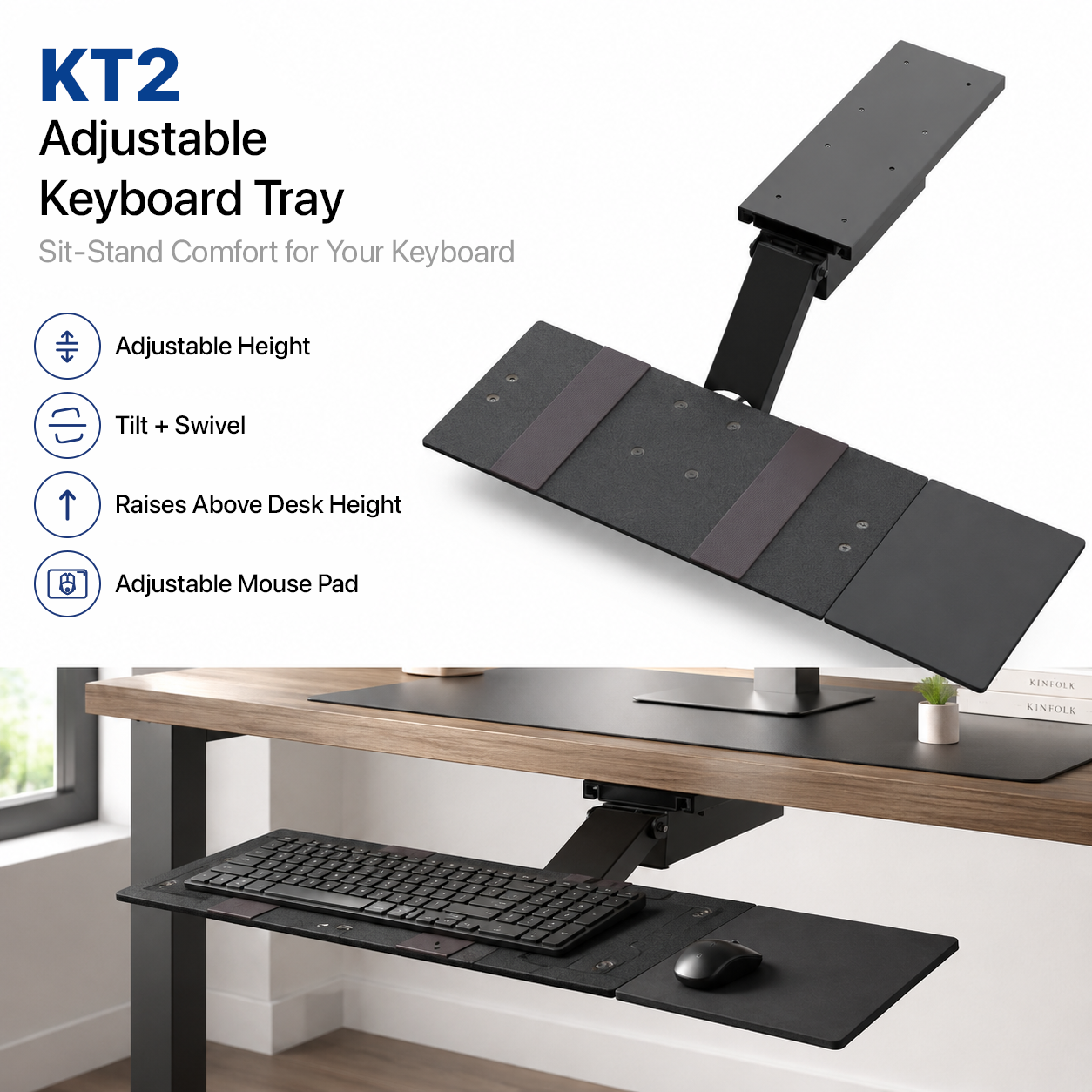
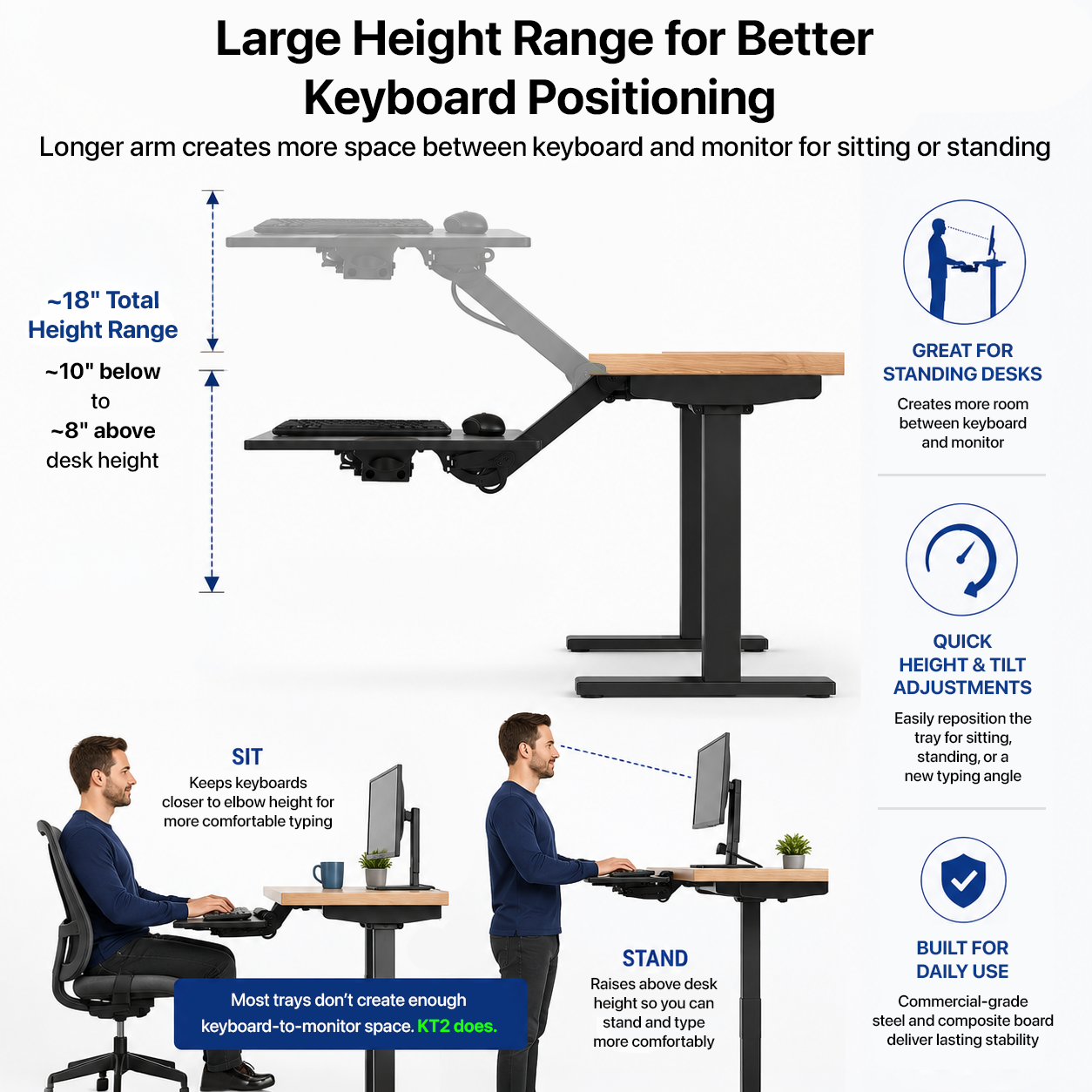
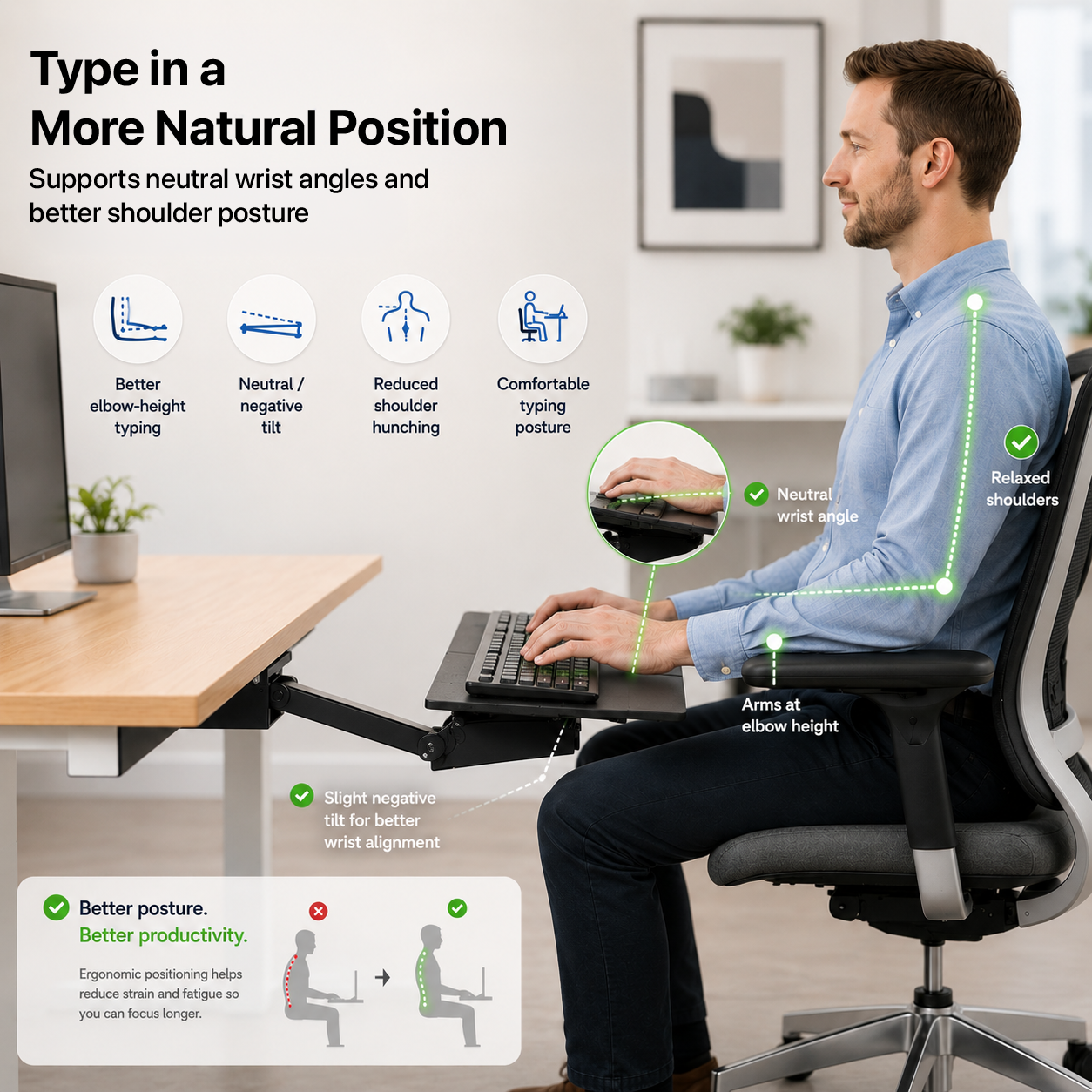
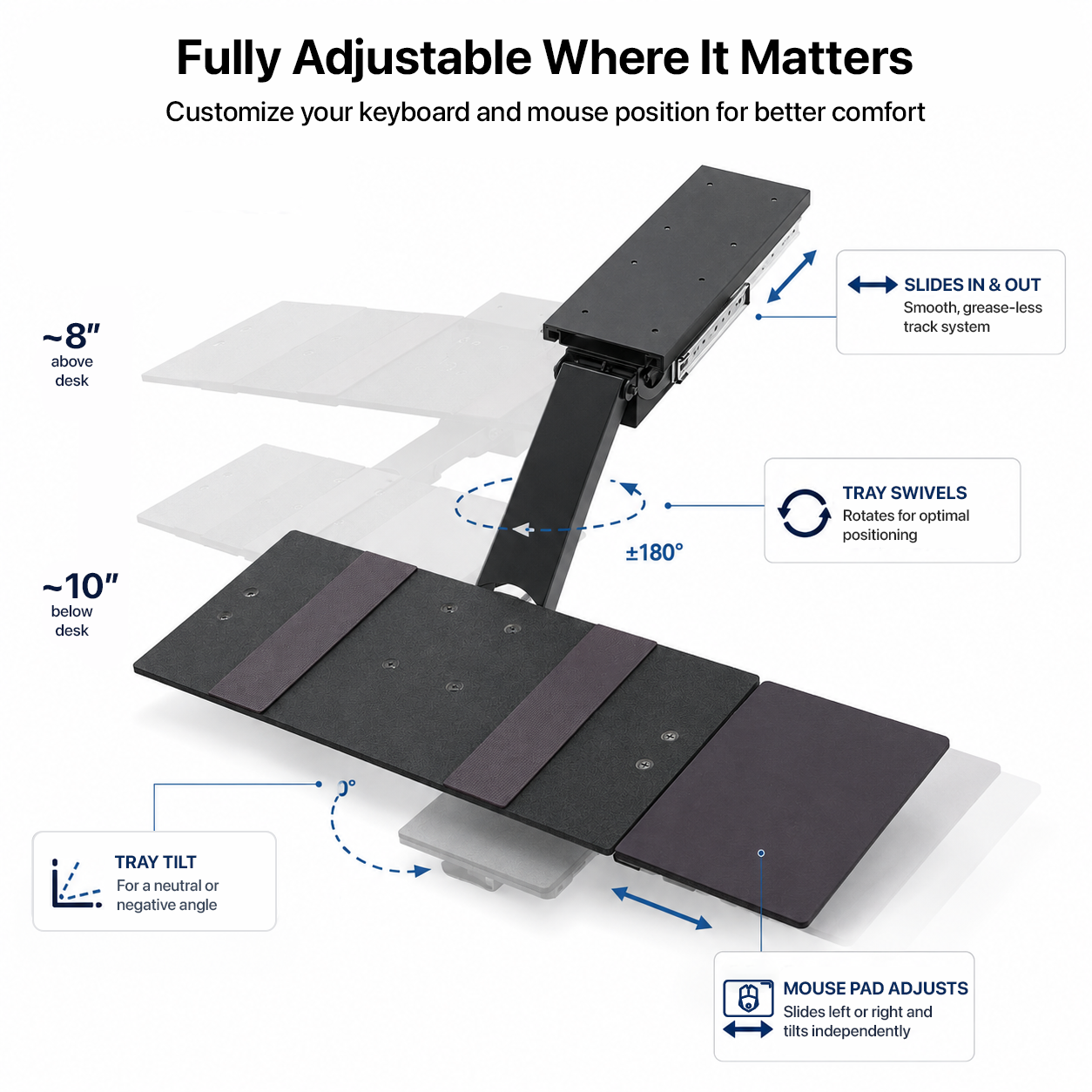
KT2 is the under-desk keyboard tray built for workstations that need more range than a conventional slide-out tray can deliver. Its patented extended arm moves the keyboard from roughly 10 in below the desktop to about 8 in above it, giving seated and standing users far more freedom to position the keyboard independently from the monitor.
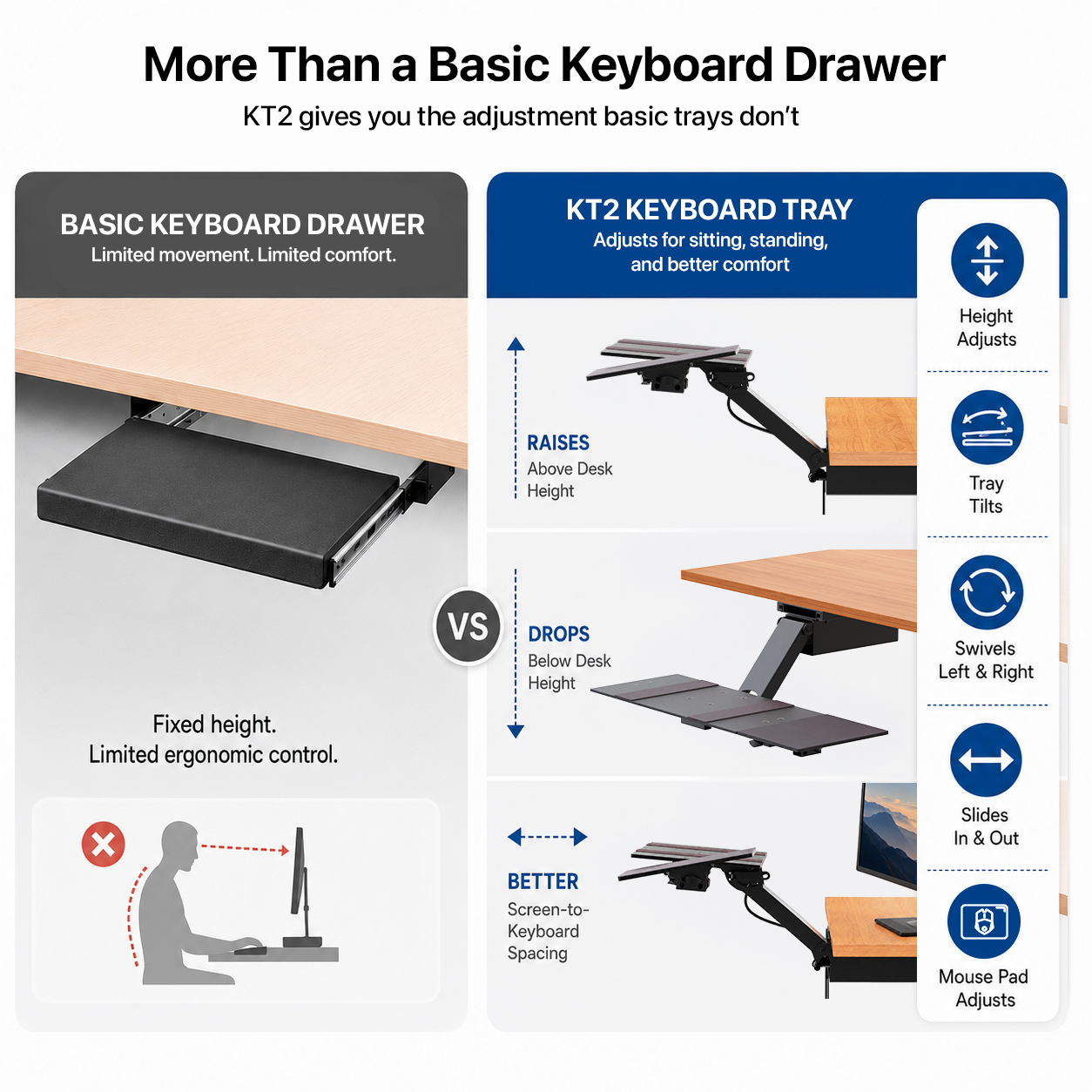
This is not a basic slide-out tray
Extended vertical range changes what an under-desk tray can do
~18 in span
Extended vertical travel
Move from roughly 10 in below the desktop to about 8 in above it.
Sit + stand
One tray for both positions
Keep the keyboard independently adjustable as the workstation height changes.
Height + tilt
Fine-tune typing position
Change elevation and keyboard angle instead of settling for desk height.
Left or right
Separate mouse platform
Place the mouse on either side and adjust its distance from the keyboard.
Patented
Commercial-grade build
Designed for daily office use with the range and hardware to support serious workstations.
The range is the reason to buy KT2
Drop the keyboard far below the desk - or bring it above the desktop for standing work
A much larger working envelope than standard under-desk trays
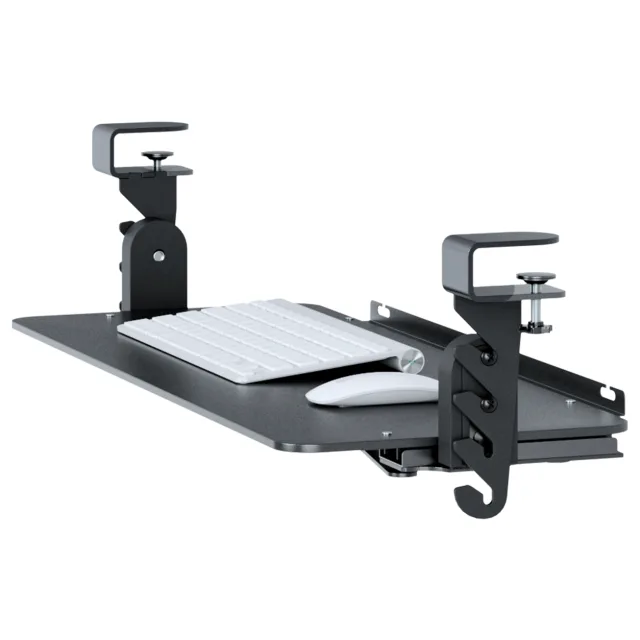
Standard keyboard trays are usually designed to live just beneath a desktop. KT2 uses a longer articulated arm so the keyboard can travel much farther. That makes it useful when the screen stays on the desk but your hands need to work lower, or when you want to raise the keyboard above the desktop for standing use.
Approx. 10 in below desktop at the low end.
Approx. 8 in above desktop at the high end.
Useful with fixed desks and height-adjustable desks.
Lets keyboard height change independently from monitor height.
Your hands should not be trapped in one position
Change height, tilt, slide depth, and mouse placement around the way you work
Keyboard and mouse positioning are both adjustable
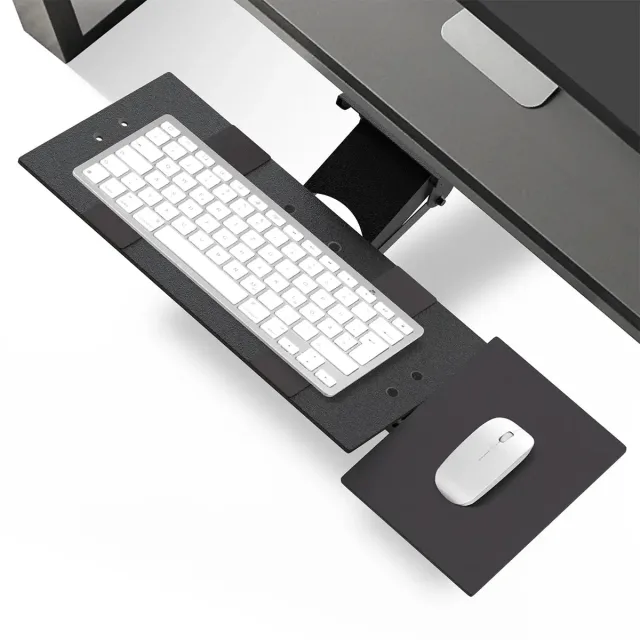
KT2 goes beyond vertical travel. Adjust the keyboard tilt, move the tray in and out, and position the separate mouse platform on the left or right. The goal is simple: bring the input devices to the user instead of forcing the user to reach toward the desk.
Adjustable keyboard height.
Adjustable keyboard tilt.
Slide the tray in or out beneath the desk.
Mouse platform mounts on the right or left.
Mouse distance can be adjusted independently.
Built for sit-stand workstations
Standing desk height does not automatically mean keyboard height is right
Separate the keyboard position from the desktop position
A sit-stand desk moves the entire work surface. KT2 gives the keyboard another layer of adjustment, helping different users and different working heights dial in a more natural input position without moving every object on the desktop.
Useful for seated and standing work.
Helpful for shared workstations with different users.
Extended travel accommodates more body sizes and desk setups.
Tray can swivel through a wide arc when surrounding desk structure allows.
A complete under-desk system
KT2 includes the tray, mouse platform, KT Bridge, mounting hardware + instructions
Everything needed for the intended installation is in the system
KT2 is a permanent screw-mounted under-desk keyboard tray. The system includes the main keyboard tray, separate mouse platform, KT Bridge, mounting hardware, and installation instructions.
Keyboard tray assembly.
Separate left- or right-side mouse platform.
KT Bridge included.
Mounting hardware included.
Installation instructions included.
Specifications
The important details at a glance
Mount type
Permanent screw-mounted under-desk installation
Approx. vertical range
About 10 in below to 8 in above desktop level
Keyboard adjustment
Height, tilt, slide depth, and swivel subject to surrounding obstructions
Mouse platform
Separate platform with right- or left-side placement and adjustable distance
Best use
Sit-stand desks, shared workstations, and setups needing extended vertical travel
Patent status
Patented design
Included
Keyboard tray, mouse platform, KT Bridge, mounting hardware, and instructions
Warranty
1-year limited warranty
Why KT2: choose it when a conventional under-desk tray does not travel far enough. KT2 is built around extended vertical reach so the keyboard can work for both seated and standing positions.
See KT2 in action
Lower when seated. Higher when standing. Fine-tune everything in between.
Downloads
Installation + dimensions
KT2 Installation Manual
KT2 Dimensions + Components
Frequently asked questions
KT2 questions
How is KT2 different from a standard keyboard tray?
KT2 is built around a much larger vertical working range. It can move from roughly 10 in below the desktop to about 8 in above it, making it useful for both seated and standing positions.
How is KT2 different from KT1?
KT2 uses a longer arm and provides substantially more vertical travel, including the ability to raise the keyboard above desktop height for standing work.
Can I use KT2 with a standing desk?
Yes. KT2 is specifically useful with sit-stand workstations because the keyboard can be positioned independently from the desktop.
Can the mouse platform go on either side?
Yes. The separate mouse platform can be positioned on either the right or left side and its distance from the keyboard can be adjusted.
Does KT2 swivel?
Yes. The tray can swivel through a wide range, although actual movement depends on surrounding desk structure and other obstructions.
Is drilling required?
Yes. KT2 is a permanent screw-mounted under-desk tray and requires installation beneath a suitable desktop.
Is the KT Bridge included?
Yes. KT2 includes the KT Bridge along with the keyboard tray, mouse platform, mounting hardware, and instructions.
What warranty is included?
KT2 includes a 1-year limited warranty.
Delivery and returns follow our Shipping Policy and 30-day Return & Refund Policy. Ask us to confirm any separate manufacturer warranty for the exact item.
| Weight | 8.165 kg |
|---|---|
| Original brand | Uncaged Ergonomics |
| Mount type | Permanent screw-mounted under-desk installation |
| Approx. vertical range | About 10 in below to 8 in above desktop level |
| Keyboard adjustment | Height, tilt, slide depth, and swivel subject to surrounding obstructions |
| Mouse platform | Separate platform with right- or left-side placement and adjustable distance |
| Best use | Sit-stand desks, shared workstations, and setups needing extended vertical travel |
| Patent status | Patented design |
| Included | Keyboard tray, mouse platform, KT Bridge, mounting hardware, and instructions |
| Warranty | 1-year limited warranty |
Compare desk clearance, mount pattern, stated capacity and the equipment dimensions you need to support.
Check the exact fitting pattern and hardware; not every stand or arm supports every screen or desk.
Use and care for this item according to its supplied manufacturer instructions. Confirm the exact model, dimensions and selected options above; features not stated for this product are not promised.
Compare desk clearance, mount pattern, stated capacity and the equipment dimensions you need to support.
Check the exact fitting pattern and hardware; not every stand or arm supports every screen or desk.
Available options are listed on each product. Select the exact option before adding it to your cart; not every item offers every color or size.
Contact [email protected] with the product name and selected option.
Free standard U.S. shipping. No minimum order. Estimated 5–8 business days total.
Shipping policyContact us within 30 days after delivery for return instructions.
Returns & refunds