
Shipping, explained
Free standard U.S. shipping. No minimum order. Estimated 5–8 business days total.
Shipping policy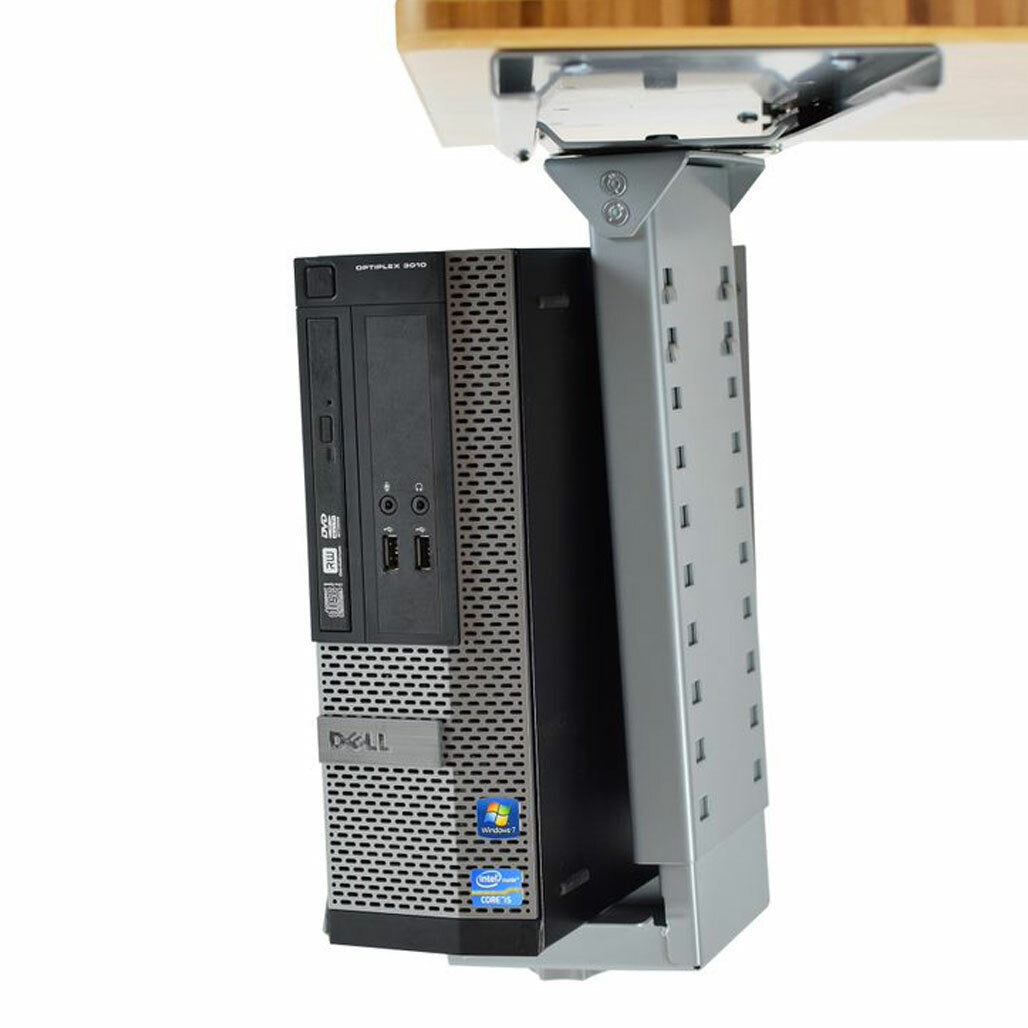
$49.99
A closer look
.cpu-pdp,
.cpu-pdp * {
box-sizing: border-box;
}
.cpu-pdp {
--ue-green: #00A934;
--ue-text: #1f1f1f;
--ue-muted: #666;
--ue-border: #e7e7e7;
--ue-soft: #f7f7f7;
color: var(--ue-text);
font-family: inherit;
}
.cpu-pdp img,
.cpu-pdp iframe {
display: block;
max-width: 100%;
}
.cpu-pdp img {
height: auto;
}
.cpu-wrap {
width: min(1200px, calc(100% - 40px));
margin: 0 auto;
}
.cpu-section {
padding: 48px 0;
}
.cpu-section + .cpu-section {
border-top: 1px solid var(--ue-border);
}
.cpu-section--soft {
background: var(--ue-soft);
}
.cpu-eyebrow {
margin: 0 0 10px;
color: var(--ue-green);
font-size: 13px;
font-weight: 700;
letter-spacing: .08em;
text-transform: uppercase;
}
.cpu-pdp h2,
.cpu-pdp h3 {
margin: 0;
color: var(--ue-text);
font-family: inherit;
text-transform: none;
}
.cpu-pdp h2 {
font-size: clamp(28px, 3vw, 36px);
line-height: 1.15;
font-weight: 700;
letter-spacing: -.02em;
}
.cpu-pdp h3 {
font-size: 20px;
line-height: 1.3;
font-weight: 700;
}
.cpu-pdp p,
.cpu-pdp li,
.cpu-pdp td,
.cpu-pdp th,
.cpu-pdp summary {
font-size: 16px;
line-height: 1.6;
}
.cpu-lead {
margin: 16px 0 0;
color: var(--ue-muted);
max-width: 700px;
}
.cpu-grid-2 {
display: grid;
grid-template-columns: minmax(0, 1.05fr) minmax(0, .95fr);
gap: 48px;
place-items: center stretch;
}
.cpu-hero-media,
.cpu-feature-media {
overflow: hidden;
border-radius: 18px;
background: var(--ue-soft);
}
.cpu-hero-media img,
.cpu-feature-media img {
width: 100%;
}
.cpu-feature-grid {
display: grid;
grid-template-columns: repeat(5, minmax(0, 1fr));
gap: 14px;
margin-top: 30px;
}
.cpu-feature {
padding: 18px;
border: 1px solid var(--ue-border);
border-radius: 14px;
background: #fff;
}
.cpu-feature h3 {
margin-bottom: 6px;
}
.cpu-feature p {
margin: 0;
color: var(--ue-muted);
line-height: 1.5;
}
.cpu-number {
display: block;
margin-bottom: 9px;
color: var(--ue-green);
font-size: 27px;
line-height: 1;
font-weight: 700;
}
.cpu-feature-row {
display: grid;
grid-template-columns: minmax(0, 1fr) minmax(0, 1fr);
gap: 40px;
place-items: center stretch;
}
.cpu-feature-row + .cpu-feature-row {
margin-top: 42px;
}
.cpu-feature-row ul {
margin: 16px 0 0;
padding-left: 20px;
}
.cpu-feature-row li + li {
margin-top: 8px;
}
.cpu-model-grid {
display: grid;
grid-template-columns: 1fr 1fr;
gap: 18px;
margin-top: 28px;
}
.cpu-model {
padding: 22px;
border: 1px solid var(--ue-border);
border-radius: 16px;
background: #fff;
}
.cpu-model-tag {
display: inline-block;
margin-bottom: 10px;
padding: 5px 9px;
border-radius: 999px;
background: #f4fbf6;
color: var(--ue-green);
font-size: 13px;
font-weight: 700;
}
.cpu-model p {
margin: 9px 0 0;
color: var(--ue-muted);
}
.cpu-table-wrap {
overflow-x: auto;
margin-top: 24px;
border: 1px solid var(--ue-border);
border-radius: 14px;
background: #fff;
}
.cpu-table {
width: 100%;
min-width: 520px;
border-collapse: collapse;
}
.cpu-table th,
.cpu-table td {
padding: 13px 16px;
border-bottom: 1px solid var(--ue-border);
}
.cpu-table tr:last-child th,
.cpu-table tr:last-child td {
border-bottom: 0;
}
.cpu-table th {
width: 36%;
background: #fafafa;
font-weight: 700;
}
.cpu-callout {
margin-top: 24px;
padding: 18px 20px;
border-left: 4px solid var(--ue-green);
background: #f4fbf6;
}
.cpu-callout p {
margin: 0;
}
.cpu-video-grid {
display: grid;
grid-template-columns: 1fr 1fr;
gap: 18px;
margin-top: 28px;
}
.cpu-video-card {
padding: 16px;
border: 1px solid var(--ue-border);
border-radius: 16px;
background: #fff;
}
.cpu-video-card h3 {
margin-bottom: 12px;
}
.cpu-video {
position: relative;
aspect-ratio: 16 / 9;
overflow: hidden;
border-radius: 12px;
background: #000;
}
.cpu-video iframe {
width: 100%;
height: 100%;
border: 0;
}
.cpu-faq {
margin-top: 24px;
border-top: 1px solid var(--ue-border);
}
.cpu-faq details {
border-bottom: 1px solid var(--ue-border);
}
.cpu-faq summary {
position: relative;
padding: 18px 40px 18px 0;
cursor: pointer;
font-weight: 700;
list-style: none;
}
.cpu-faq summary::-webkit-details-marker {
display: none;
}
.cpu-faq summary::after {
content: "+";
position: absolute;
right: 4px;
top: 15px;
color: var(--ue-green);
font-size: 24px;
font-weight: 500;
}
.cpu-faq details[open] summary::after {
content: "−";
}
.cpu-faq details div {
padding: 0 0 18px;
color: var(--ue-muted);
}
.cpu-faq details p {
margin: 0;
}
@media (max-width: 1050px) {
.cpu-feature-grid {
grid-template-columns: repeat(3, minmax(0, 1fr));
}
}
@media (max-width: 900px) {
.cpu-section {
padding: 40px 0;
}
.cpu-grid-2,
.cpu-feature-row,
.cpu-model-grid,
.cpu-video-grid {
grid-template-columns: 1fr;
gap: 28px;
}
.cpu-feature-grid {
grid-template-columns: 1fr 1fr;
}
}
@media (max-width: 600px) {
.cpu-wrap {
width: min(100% - 28px, 1200px);
}
.cpu-section {
padding: 32px 0;
}
.cpu-feature-grid {
grid-template-columns: 1fr;
}
.cpu-feature {
padding: 17px;
}
.cpu-table th,
.cpu-table td {
padding: 12px 14px;
}
}
Under-Desk CPU Holder
Get the computer tower off the floor and out of your workspace
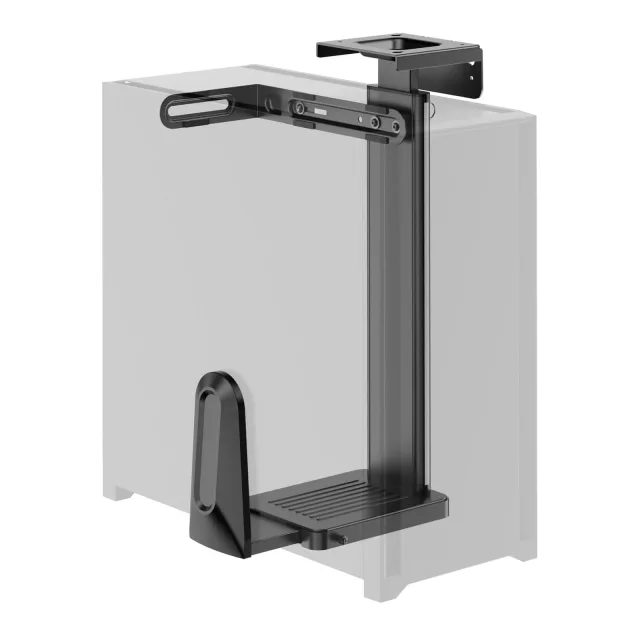
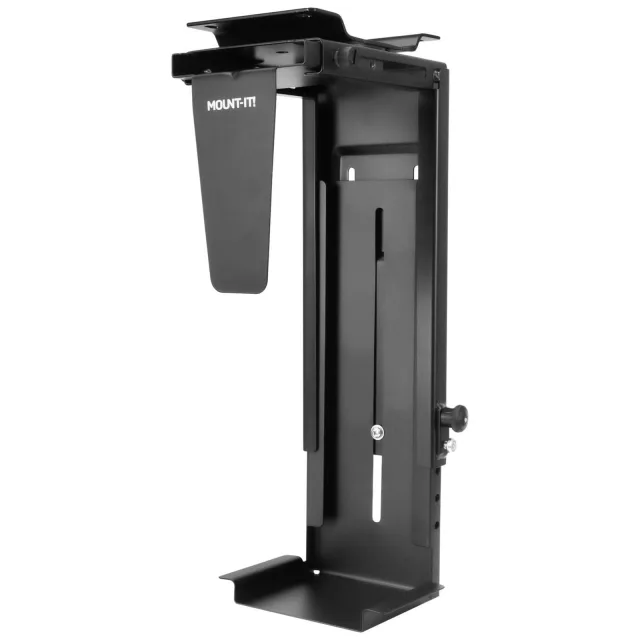
An under-desk CPU holder gets a desktop computer tower off the floor, clears valuable space, and keeps the case attached to the workstation instead of stranded underneath it. The adjustable steel cradle fits a wide range of tower sizes, while the swiveling mount brings rear ports and cables back within reach when you need them.
Put the tower where it belongs
Off the desk. Off the floor. Still easy to reach.
Under desk
Reclaim workspace
Move the computer tower away from valuable desk and floor space.
Adjustable
Fits many tower sizes
Height and width adjustment help the cradle fit a broad range of computer cases.
360°
Swivel for access
Turn the tower when you need to reach rear ports, cables, or connections.
Off floor
Less dust exposure
Elevating the tower helps keep it farther from floor-level dust and debris.
Steel
Heavy-duty support
A rigid metal cradle keeps the computer supported beneath the workstation.
Stop sacrificing the floor to the computer
Turn dead space beneath the desk into dedicated CPU storage
Keep the tower with the workstation without keeping it in the way
Desktop towers are awkward wherever they land. Put one on the desk and it steals work surface. Put it on the floor and it eats legroom, collects more floor-level debris, and can become disconnected from a height-adjustable desk. Mounting beneath the work surface solves all three problems at once.
Frees desk space for actual work.
Clears floor area around the workstation.
Keeps the tower physically connected to the desk structure.
Especially useful with height-adjustable workstations.
One fixed-size bracket would be too limiting
Adjust the cradle around the tower instead of hoping the tower fits
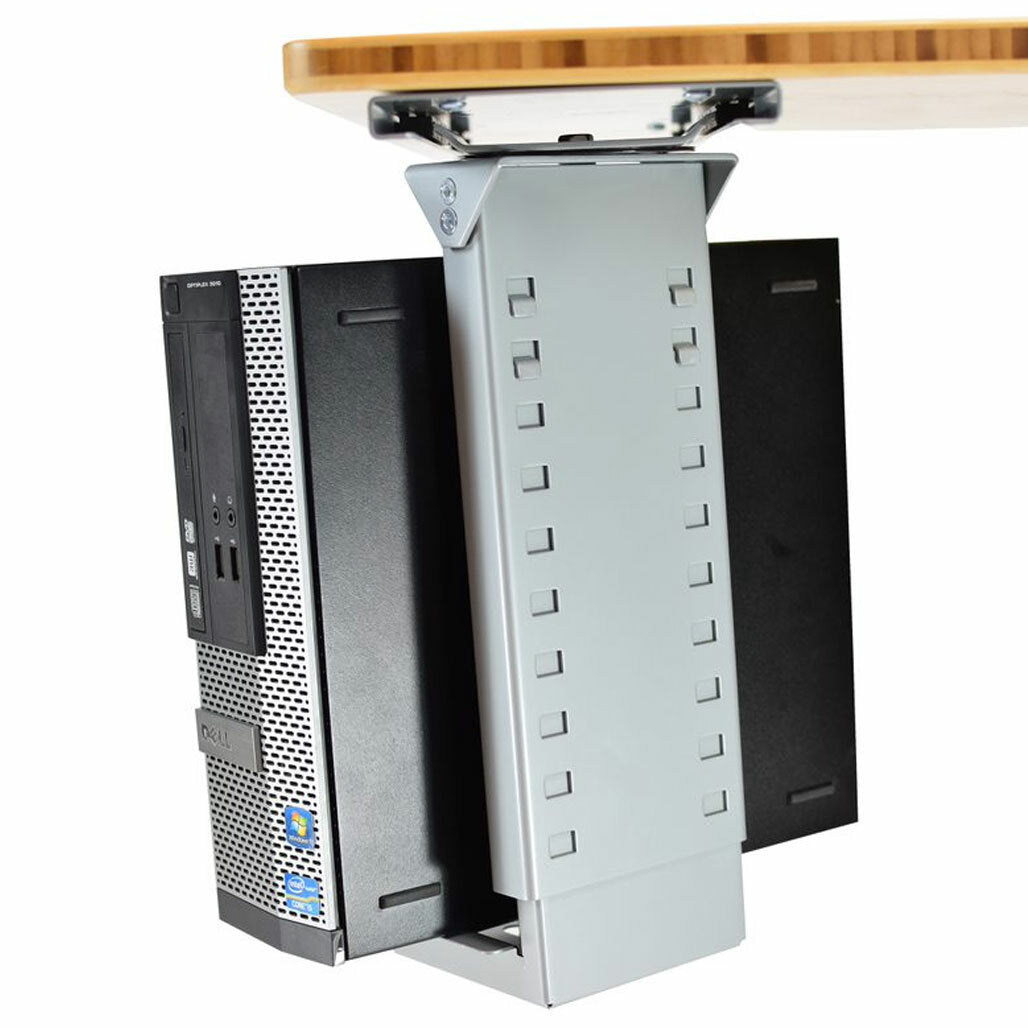
Height + width adjustment accommodate many computer cases
The holder is designed to adjust around different CPU tower dimensions rather than forcing every computer into one fixed bracket size. Before ordering, compare your case measurements with the product dimensions shown for the selected model.
Adjustable holder height.
Adjustable holder width.
Designed for many common desktop computer towers.
Check case measurements before installation.
Mount it under the desk without burying the ports
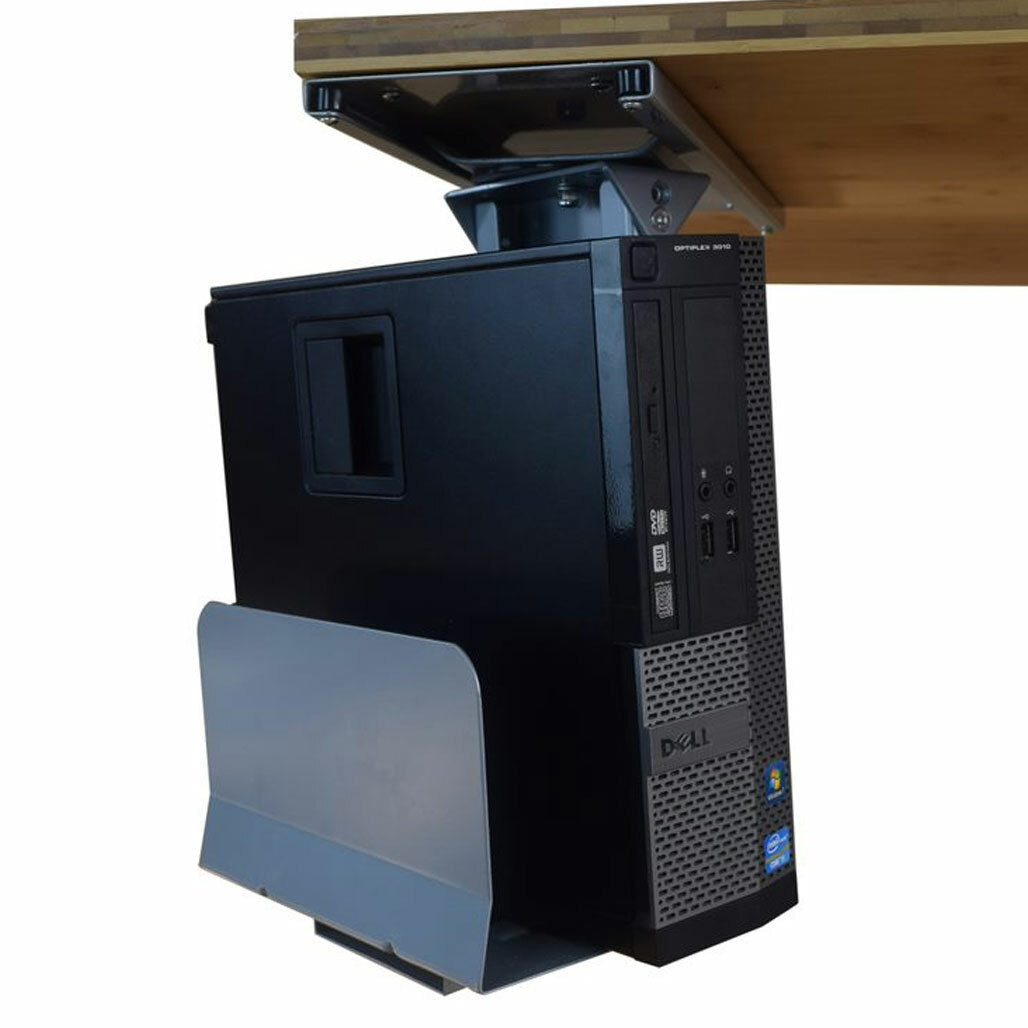
Swivel the tower toward you when cables or connections need attention
360° movement makes under-desk storage much more usable
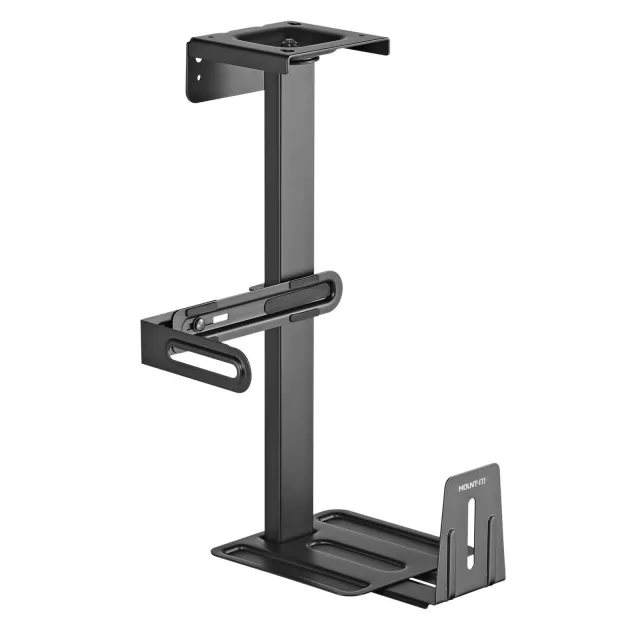
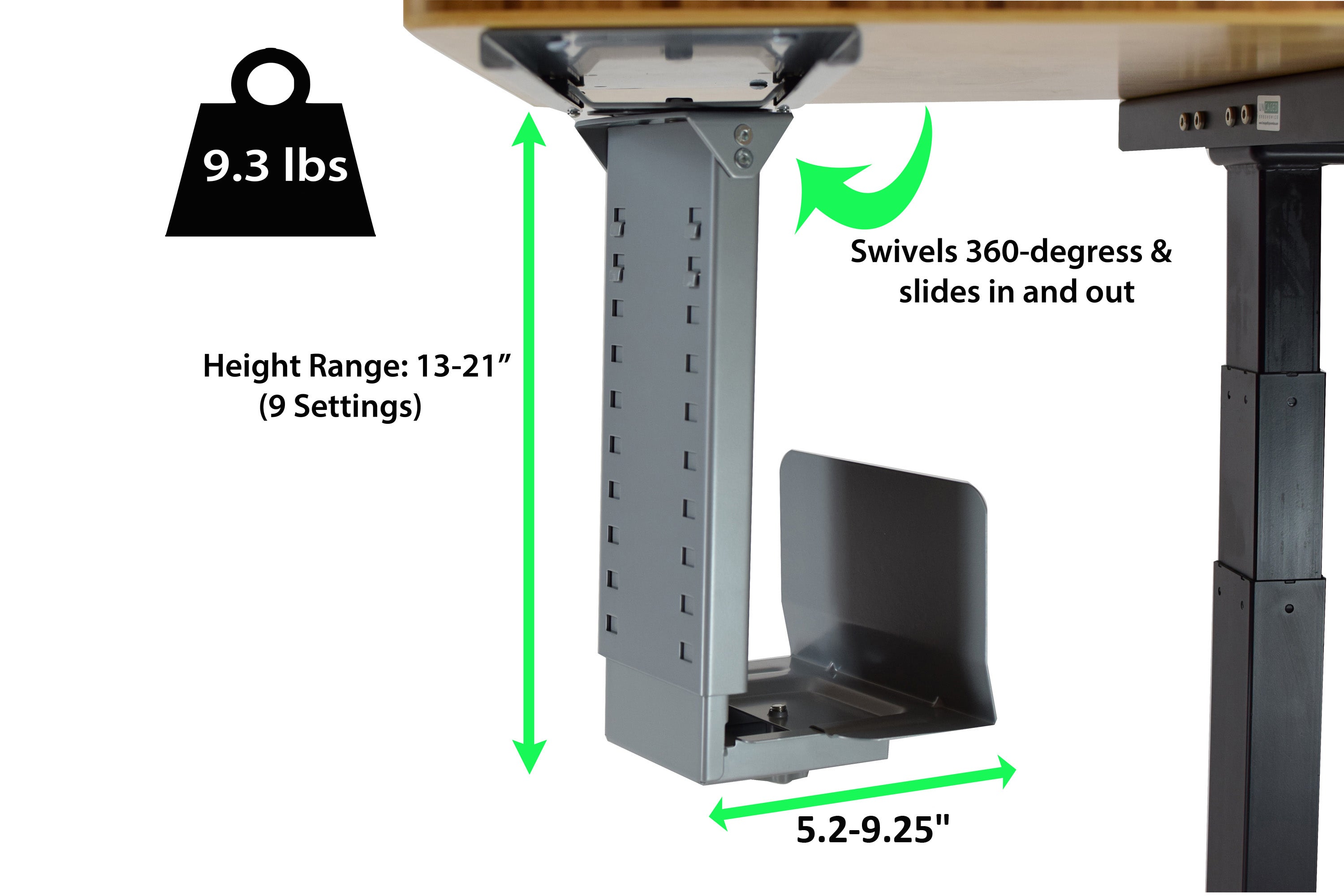
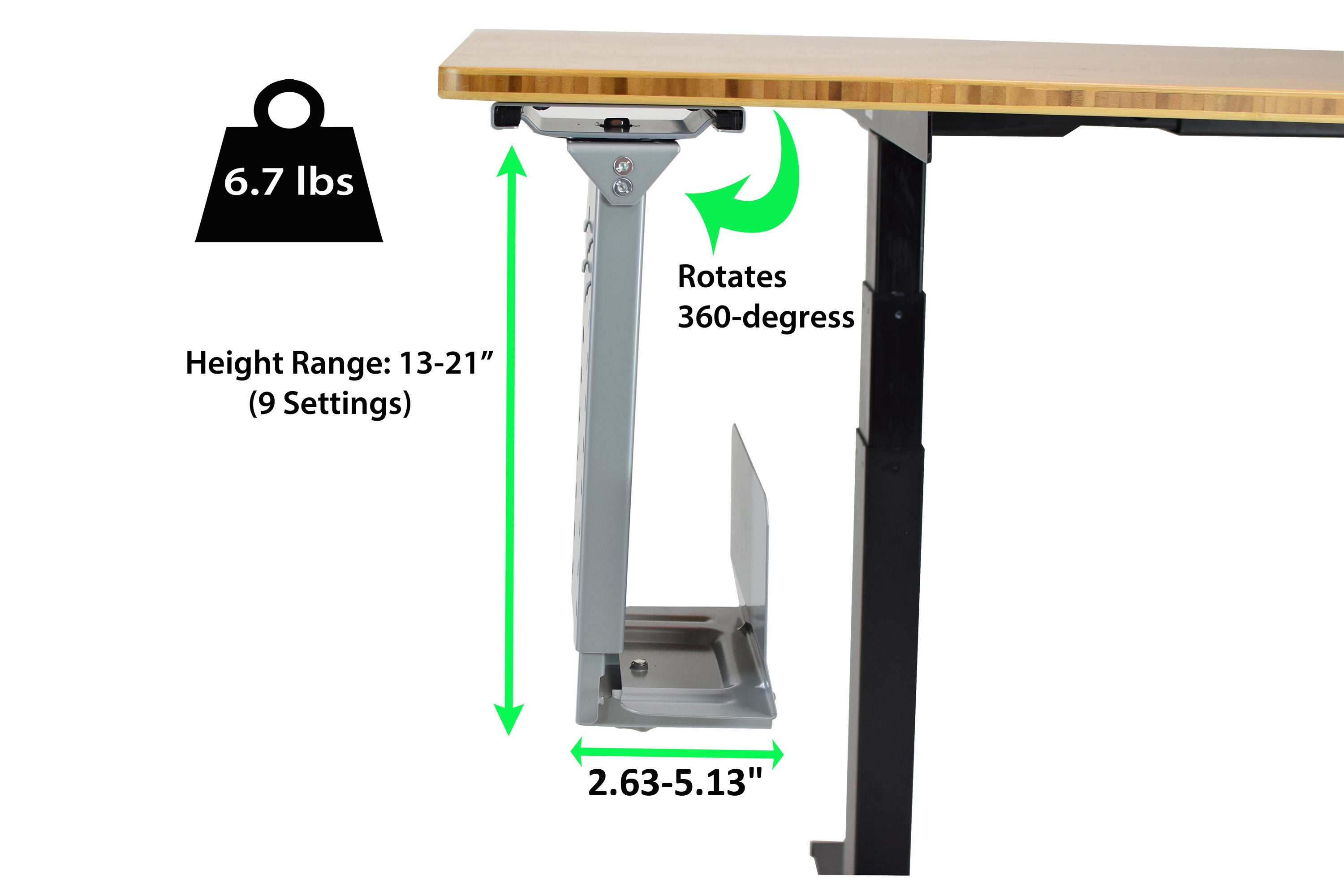
Rear USB ports, display connections, power cables, and network cables should not become inaccessible just because the tower is mounted underneath the workstation. Both models swivel through 360°, letting you rotate the computer toward a more convenient service position.
360° swivel on CPU1g and CPU2g.
Easier access to rear ports and cables.
No need to drag the tower across the floor.
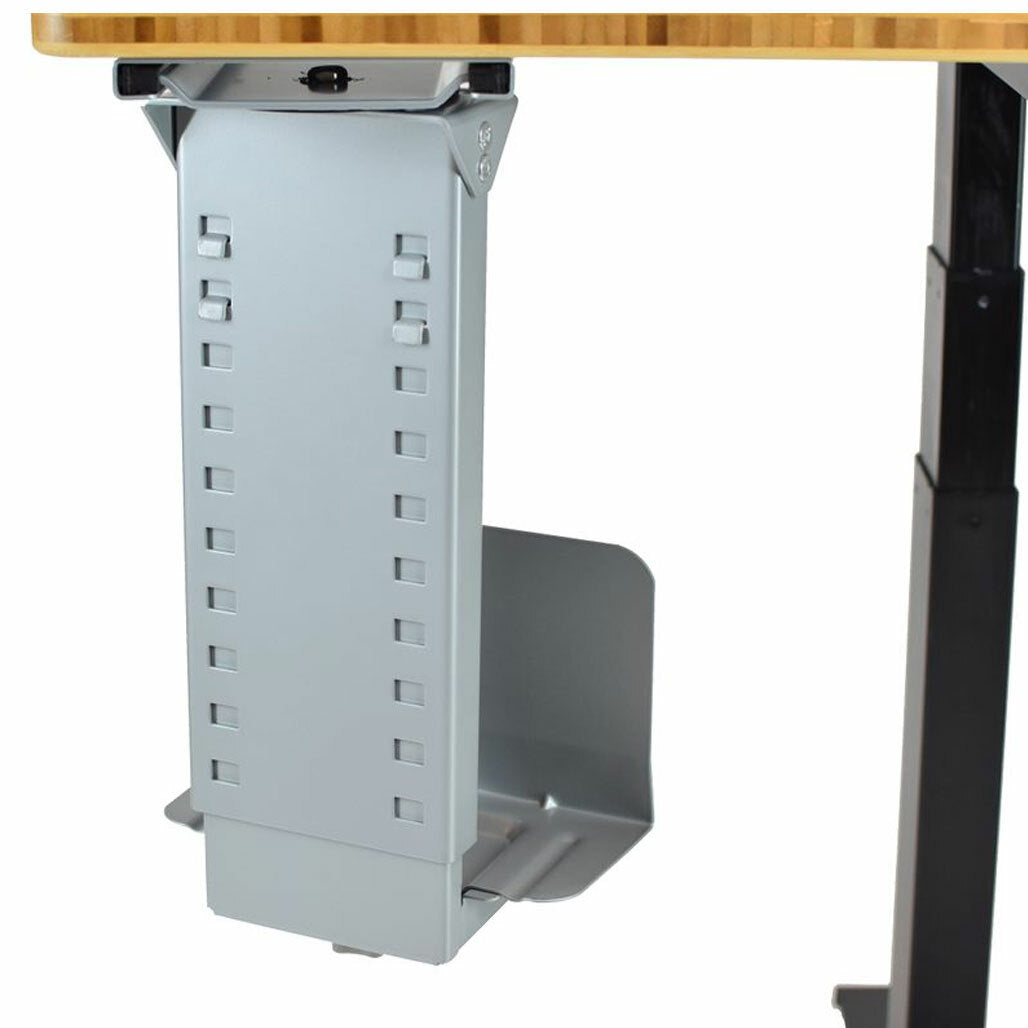
CPU2g adds slide-in / slide-out travel beneath the desk.
A better place for the computer than the floor
Lift the tower away from floor-level dust, debris, and crowded corners
Elevated storage keeps the case in a cleaner working zone
Computer towers placed directly on the floor sit where dust, hair, and debris naturally collect. Mounting the case beneath the desk raises it away from that floor-level environment and leaves more open space around the tower than wedging it into a corner or beneath furniture.
Raises the tower away from floor-level debris.
Helps preserve open space around the computer case.
Keeps the tower from being boxed in by furniture on the floor.
Always preserve the computer manufacturer's required ventilation clearances.
Choose how much access you want
CPU1g swivels. CPU2g swivels + slides.
CPU1g
360° swivel on a fixed under-desk mounting plate
Choose CPU1g when you want the tower mounted securely beneath the desk with full rotational access. It swivels through 360° but does not slide in and out.
CPU2g
360° swivel + slide-in / slide-out access
Choose CPU2g when you want the same rotational access plus the ability to pull the tower farther out from beneath the desk for easier service and cable access.
Simple choice: CPU1g is the cleaner fixed mount. CPU2g is the better choice when frequent rear-port or cable access matters.
Specifications
The important details at a glance
Mount location
Under desk
Fit adjustment
Adjustable height + width for a range of computer tower sizes
CPU1g movement
360° swivel on fixed mounting plate
CPU2g movement
360° swivel + slide-in / slide-out travel
Construction
Heavy-duty steel
Primary benefits
Reclaims desk/floor space, improves access, raises tower away from floor-level debris
Standing-desk use
Keeps the computer tower attached beneath the workstation as the desk moves
Before ordering: measure your computer case and compare it with the selected holder's published dimensions. Leave the ventilation clearance required by your computer manufacturer.
See both models in action
Choose fixed swivel access or swivel + slide access
CPU1g - 360° swivel
CPU2g - swivel + slide
Frequently asked questions
Under-Desk CPU Holder questions
What is the difference between CPU1g and CPU2g?
CPU1g swivels 360° on a fixed under-desk mounting plate. CPU2g swivels 360° and also slides in and out beneath the desk for additional access.
Will it fit my computer tower?
The holder adjusts in height and width to fit a range of tower sizes. Measure your computer case and compare those measurements with the dimensions published for the model you select.
Why mount the computer under the desk?
Under-desk mounting frees desk and floor space, raises the tower away from floor-level dust and debris, and keeps the computer attached to the workstation.
Can I still reach the ports and cables?
Yes. Both models swivel through 360° so the tower can be rotated for easier access. CPU2g also slides outward from beneath the desk.
Is it useful with a standing desk?
Yes. Mounting the tower beneath the desk lets the computer move with a height-adjustable workstation instead of remaining on the floor while the desk rises.
Does mounting the tower improve cooling?
Raising the tower off the floor can reduce exposure to floor-level dust and can leave more open space around the case. Cooling performance still depends on the computer design, fan system, room conditions, and required ventilation clearance.
What is the holder made from?
The holder uses heavy-duty steel construction for rigid support beneath the desk.
Delivery and returns follow our Shipping Policy and 30-day Return & Refund Policy. Ask us to confirm any separate manufacturer warranty for the exact item.
| Weight | N/A |
|---|---|
| Style | Swivels & Slides – Out of Stock, Swivels |
| Original brand | Uncaged Ergonomics |
| Materials | An under-desk CPU holder gets a desktop computer tower off the floor, clears valuable space, and keeps the case attached to the workstation instead of stranded underneath it. The adjustable steel cradle fits a wide range of tower sizes, while the swiveling mount brings rear ports and cables back within reach when you need them.; The holder uses heavy-duty steel construction for rigid support beneath the desk. |
| Mount location | Under desk |
| Fit adjustment | Adjustable height + width for a range of computer tower sizes |
| CPU1g movement | 360° swivel on fixed mounting plate |
| CPU2g movement | 360° swivel + slide-in / slide-out travel |
| Construction | Heavy-duty steel |
| Primary benefits | Reclaims desk/floor space, improves access, raises tower away from floor-level debris |
| Standing-desk use | Keeps the computer tower attached beneath the workstation as the desk moves |
Compare desk clearance, mount pattern, stated capacity and the equipment dimensions you need to support.
Check the exact fitting pattern and hardware; not every stand or arm supports every screen or desk.
Use and care for this item according to its supplied manufacturer instructions. Confirm the exact model, dimensions and selected options above; features not stated for this product are not promised.
Compare desk clearance, mount pattern, stated capacity and the equipment dimensions you need to support.
Check the exact fitting pattern and hardware; not every stand or arm supports every screen or desk.
Available options are listed on each product. Select the exact option before adding it to your cart; not every item offers every color or size.
Contact [email protected] with the product name and selected option.
Free standard U.S. shipping. No minimum order. Estimated 5–8 business days total.
Shipping policyContact us within 30 days after delivery for return instructions.
Returns & refunds