
Shipping, explained
Free standard U.S. shipping. No minimum order. Estimated 5–8 business days total.
Shipping policy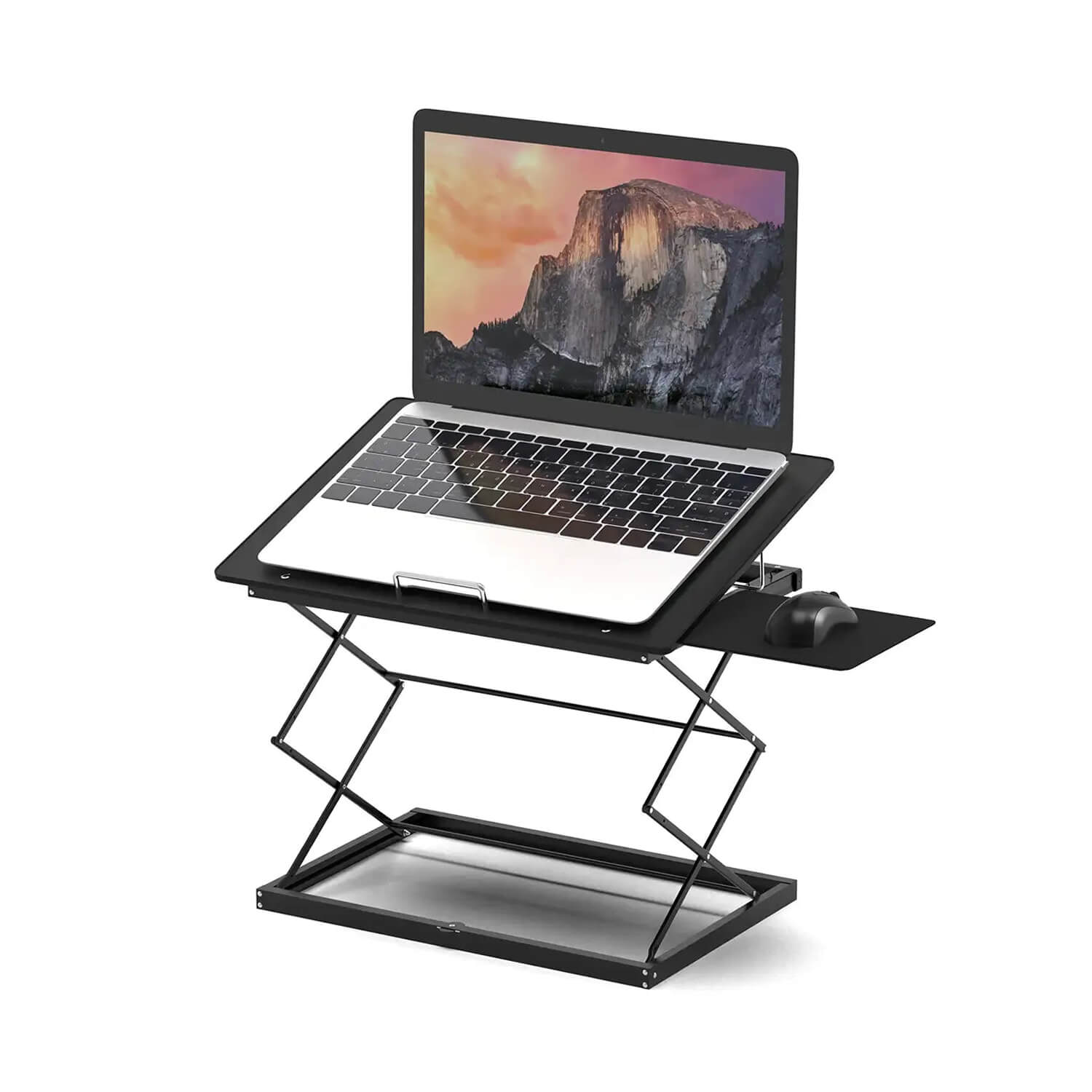
$70.00
A closer look
.cd4-pdp,
.cd4-pdp * {
box-sizing: border-box;
}
.cd4-pdp {
--ue-green: #00A934;
--ue-text: #1f1f1f;
--ue-muted: #666;
--ue-border: #e7e7e7;
--ue-soft: #f7f7f7;
color: var(--ue-text);
font-family: inherit;
}
.cd4-pdp img,
.cd4-pdp iframe {
display: block;
max-width: 100%;
}
.cd4-pdp img {
height: auto;
}
.cd4-wrap {
width: min(1200px, calc(100% - 40px));
margin: 0 auto;
}
.cd4-section {
padding: 48px 0;
}
.cd4-section + .cd4-section {
border-top: 1px solid var(--ue-border);
}
.cd4-section--soft {
background: var(--ue-soft);
}
.cd4-eyebrow {
margin: 0 0 10px;
color: var(--ue-green);
font-size: 13px;
font-weight: 700;
letter-spacing: .08em;
text-transform: uppercase;
}
.cd4-pdp h2,
.cd4-pdp h3 {
margin: 0;
color: var(--ue-text);
font-family: inherit;
text-transform: none;
}
.cd4-pdp h2 {
font-size: clamp(28px, 3vw, 36px);
line-height: 1.15;
font-weight: 700;
letter-spacing: -.02em;
}
.cd4-pdp h3 {
font-size: 20px;
line-height: 1.3;
font-weight: 700;
}
.cd4-pdp p,
.cd4-pdp li,
.cd4-pdp td,
.cd4-pdp th,
.cd4-pdp summary {
font-size: 16px;
line-height: 1.6;
}
.cd4-lead {
margin: 16px 0 0;
color: var(--ue-muted);
max-width: 700px;
}
.cd4-grid-2 {
display: grid;
grid-template-columns: minmax(0, 1.05fr) minmax(0, .95fr);
gap: 48px;
place-items: center stretch;
}
.cd4-hero-media,
.cd4-feature-media {
overflow: hidden;
border-radius: 18px;
background: var(--ue-soft);
}
.cd4-hero-media img,
.cd4-feature-media img {
width: 100%;
}
.cd4-feature-grid {
display: grid;
grid-template-columns: repeat(5, minmax(0, 1fr));
gap: 14px;
margin-top: 30px;
}
.cd4-feature {
padding: 18px;
border: 1px solid var(--ue-border);
border-radius: 14px;
background: #fff;
}
.cd4-feature h3 {
margin-bottom: 6px;
}
.cd4-feature p {
margin: 0;
color: var(--ue-muted);
line-height: 1.5;
}
.cd4-number {
display: block;
margin-bottom: 9px;
color: var(--ue-green);
font-size: 27px;
line-height: 1;
font-weight: 700;
}
.cd4-feature-row {
display: grid;
grid-template-columns: minmax(0, 1fr) minmax(0, 1fr);
gap: 40px;
place-items: center stretch;
}
.cd4-feature-row + .cd4-feature-row {
margin-top: 42px;
}
.cd4-feature-row ul {
margin: 16px 0 0;
padding-left: 20px;
}
.cd4-feature-row li + li {
margin-top: 8px;
}
.cd4-table-wrap {
overflow-x: auto;
margin-top: 24px;
border: 1px solid var(--ue-border);
border-radius: 14px;
background: #fff;
}
.cd4-table {
width: 100%;
min-width: 520px;
border-collapse: collapse;
}
.cd4-table th,
.cd4-table td {
padding: 13px 16px;
border-bottom: 1px solid var(--ue-border);
}
.cd4-table tr:last-child th,
.cd4-table tr:last-child td {
border-bottom: 0;
}
.cd4-table th {
width: 36%;
background: #fafafa;
font-weight: 700;
}
.cd4-callout {
margin-top: 24px;
padding: 18px 20px;
border-left: 4px solid var(--ue-green);
background: #f4fbf6;
}
.cd4-callout p {
margin: 0;
}
.cd4-media-grid {
display: grid;
grid-template-columns: 1.2fr .8fr;
gap: 20px;
margin-top: 28px;
}
.cd4-video {
position: relative;
aspect-ratio: 16 / 9;
overflow: hidden;
border-radius: 16px;
background: #000;
}
.cd4-video iframe {
width: 100%;
height: 100%;
border: 0;
}
.cd4-gallery {
display: grid;
grid-template-columns: 1fr;
gap: 12px;
}
.cd4-gallery img {
width: 100%;
aspect-ratio: 4 / 3;
object-fit: cover;
border-radius: 12px;
background: var(--ue-soft);
}
.cd4-faq {
margin-top: 24px;
border-top: 1px solid var(--ue-border);
}
.cd4-faq details {
border-bottom: 1px solid var(--ue-border);
}
.cd4-faq summary {
position: relative;
padding: 18px 40px 18px 0;
cursor: pointer;
font-weight: 700;
list-style: none;
}
.cd4-faq summary::-webkit-details-marker {
display: none;
}
.cd4-faq summary::after {
content: "+";
position: absolute;
right: 4px;
top: 15px;
color: var(--ue-green);
font-size: 24px;
font-weight: 500;
}
.cd4-faq details[open] summary::after {
content: "−";
}
.cd4-faq details div {
padding: 0 0 18px;
color: var(--ue-muted);
}
.cd4-faq details p {
margin: 0;
}
@media (max-width: 1050px) {
.cd4-feature-grid {
grid-template-columns: repeat(3, minmax(0, 1fr));
}
}
@media (max-width: 900px) {
.cd4-section {
padding: 40px 0;
}
.cd4-grid-2,
.cd4-feature-row,
.cd4-media-grid {
grid-template-columns: 1fr;
gap: 28px;
}
.cd4-feature-grid {
grid-template-columns: 1fr 1fr;
}
.cd4-gallery {
grid-template-columns: 1fr 1fr;
}
}
@media (max-width: 600px) {
.cd4-wrap {
width: min(100% - 28px, 1200px);
}
.cd4-section {
padding: 32px 0;
}
.cd4-feature-grid,
.cd4-gallery {
grid-template-columns: 1fr;
}
.cd4-feature {
padding: 17px;
}
.cd4-table th,
.cd4-table td {
padding: 12px 14px;
}
}
CD4 Laptop Stand + Standing Desk
Turn the laptop you already own into a sit-stand workstation
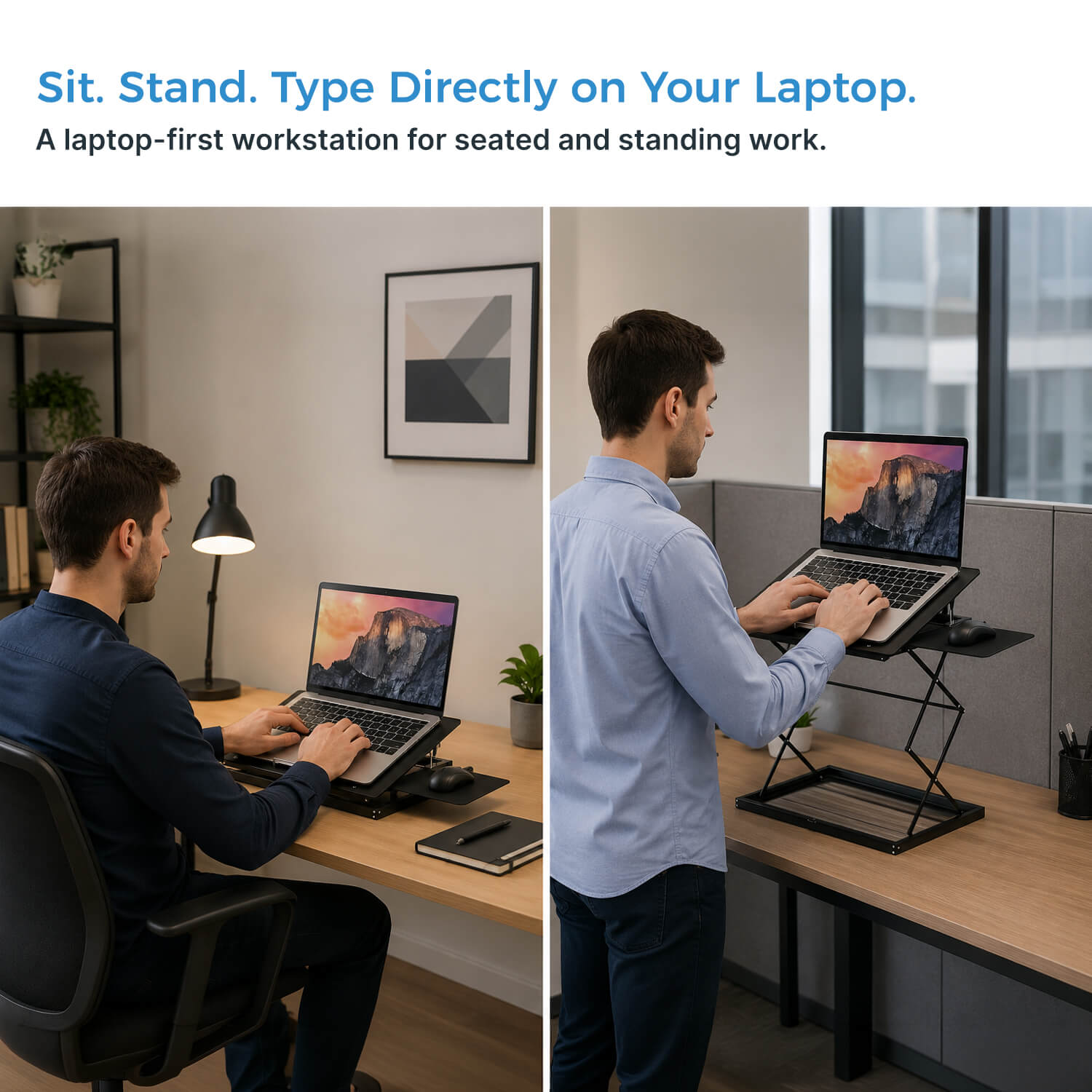
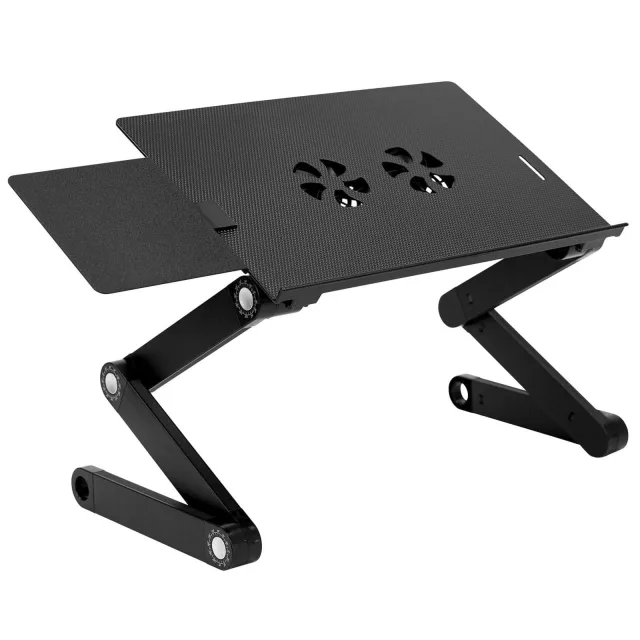
CD4 is built specifically for people who work directly on a laptop. Instead of buying a full standing desk or balancing your computer on improvised risers, choose one of four working heights, set the laptop angle, place the mouse pad on either side, and move from seated work to standing in seconds.
Built around laptop work
Four heights, three angles, and a mouse surface that goes where you need it
4 heights
Sit or stand
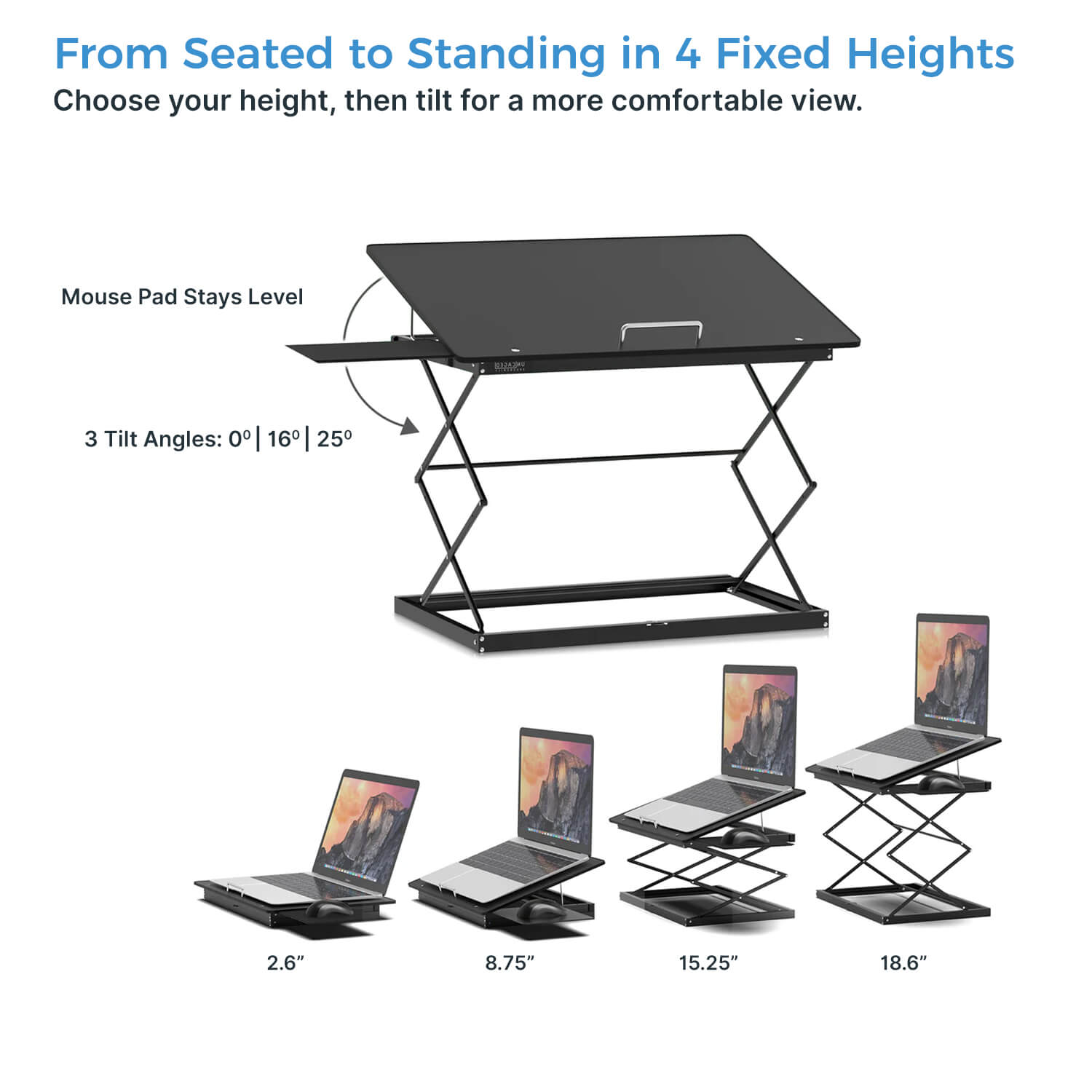
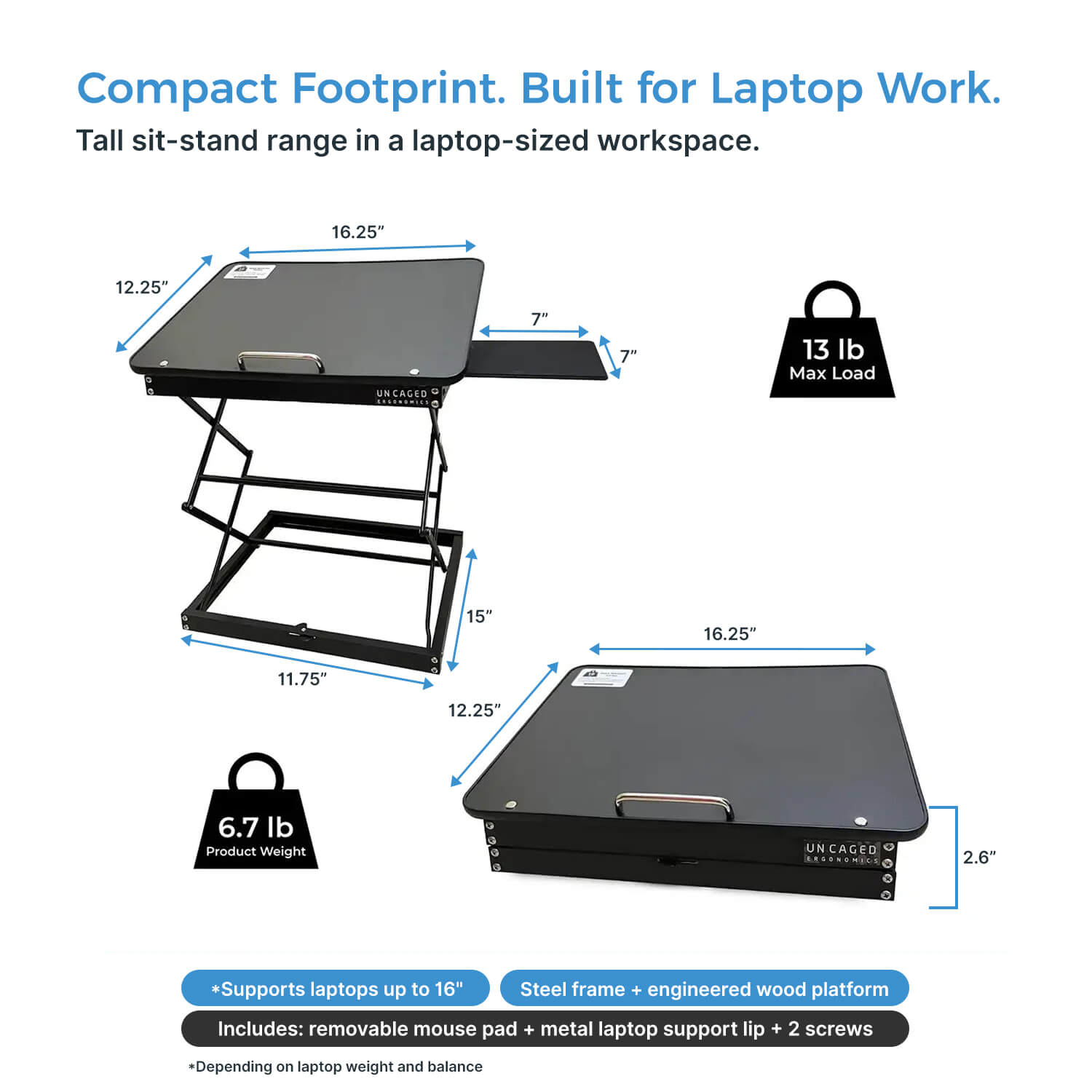
Choose 2.6, 8.75, 15.25, or 18.6 in depending on how you want to work.
3 angles
Change the laptop tilt
Use 0°, 16°, or 25° to change the keyboard and screen position.
Left or right
Level mouse pad
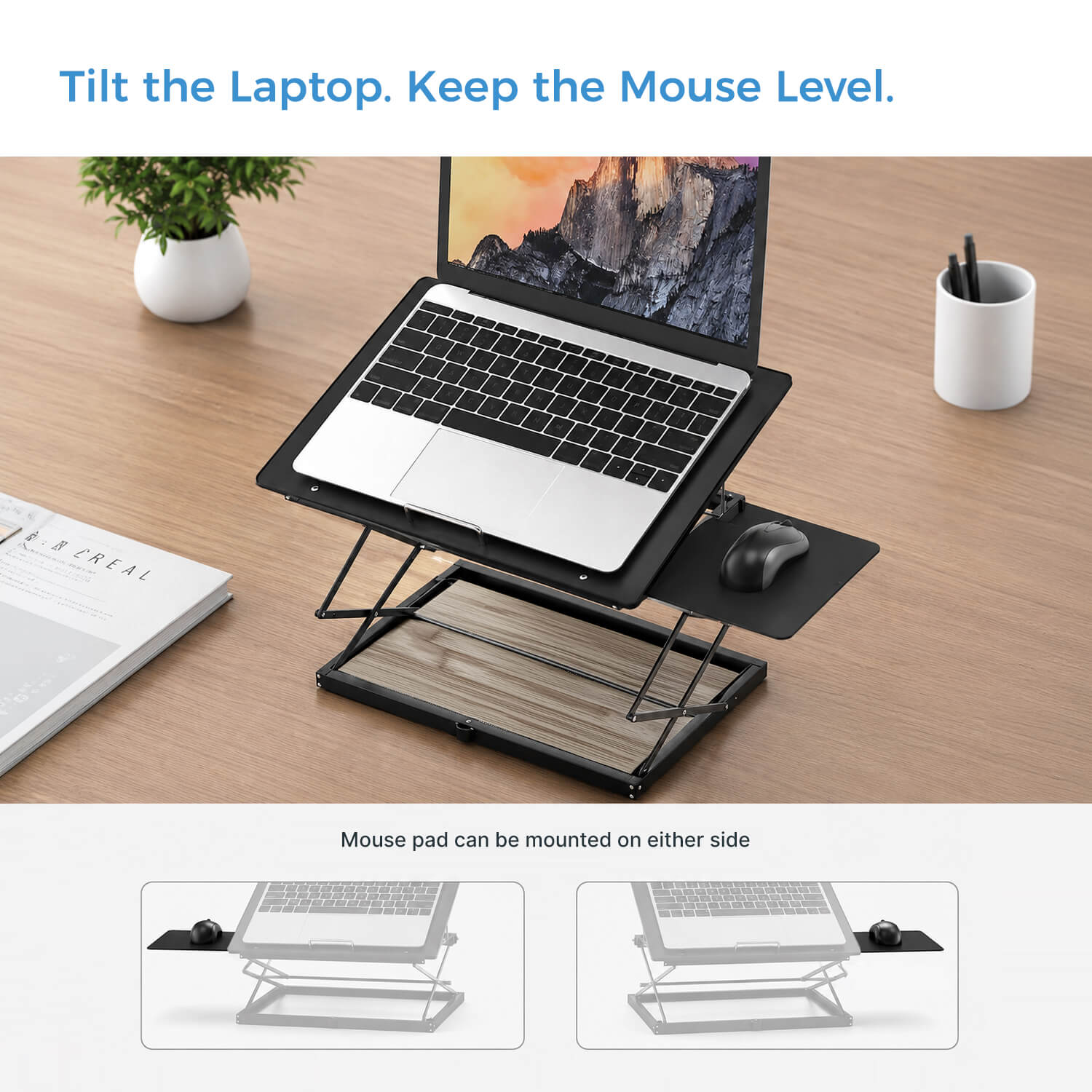
Mount the included mouse surface on either side without tilting it with the laptop.
13 lb
Maximum load
The sturdy frame supports a practical laptop workstation without oversized hardware.
Fold flat
Easy to put away
Collapse CD4 when you want your desk back or need compact storage.
Standing desk without replacing your desk
Raise the laptop instead of rebuilding the entire workspace
Go from low-profile laptop stand to standing workstation
CD4 gives a laptop user four distinct working levels without taking over the room. Use the lowest position when you want a modest lift, or raise the platform to 18.6 in when you want to work standing at a conventional desk.
2.6 in lowest position.
8.75 in intermediate position.
15.25 in elevated position.
18.6 in maximum working height.
Keep the laptop and mouse working together
Tilt the laptop without forcing your mouse onto the same angle
Three laptop angles + a separate level mouse surface
The laptop platform can sit flat or tilt to 16° or 25°. The included mouse pad remains level and can mount on either the right or left, so the pointing surface stays usable regardless of your preferred side.
0° flat laptop position.
16° moderate tilt.
25° steeper tilt.
Mouse pad installs on the right or left.
Simple enough to use every day
No motors, no installation, no permanent desk conversion
Sturdy manual adjustment without unnecessary complexity
CD4 uses a steel and engineered-wood structure to support up to 13 lb. There is nothing to plug in or install. Set the height and angle you want, work, then collapse the stand when you need the desk clear again.
Steel + engineered-wood construction.
Up to 13 lb maximum load.
No installation required.
Folds flat for storage.
Specifications
The adjustment range at a glance
Working heights
2.6, 8.75, 15.25, and 18.6 in
Laptop platform angles
0°, 16°, and 25°
Mouse pad
Included; mounts on the right or left
Mouse surface
Remains level while the laptop platform is tilted
Maximum load
Up to 13 lb
Construction
Steel + engineered wood
Installation
None required
Storage
Folds flat
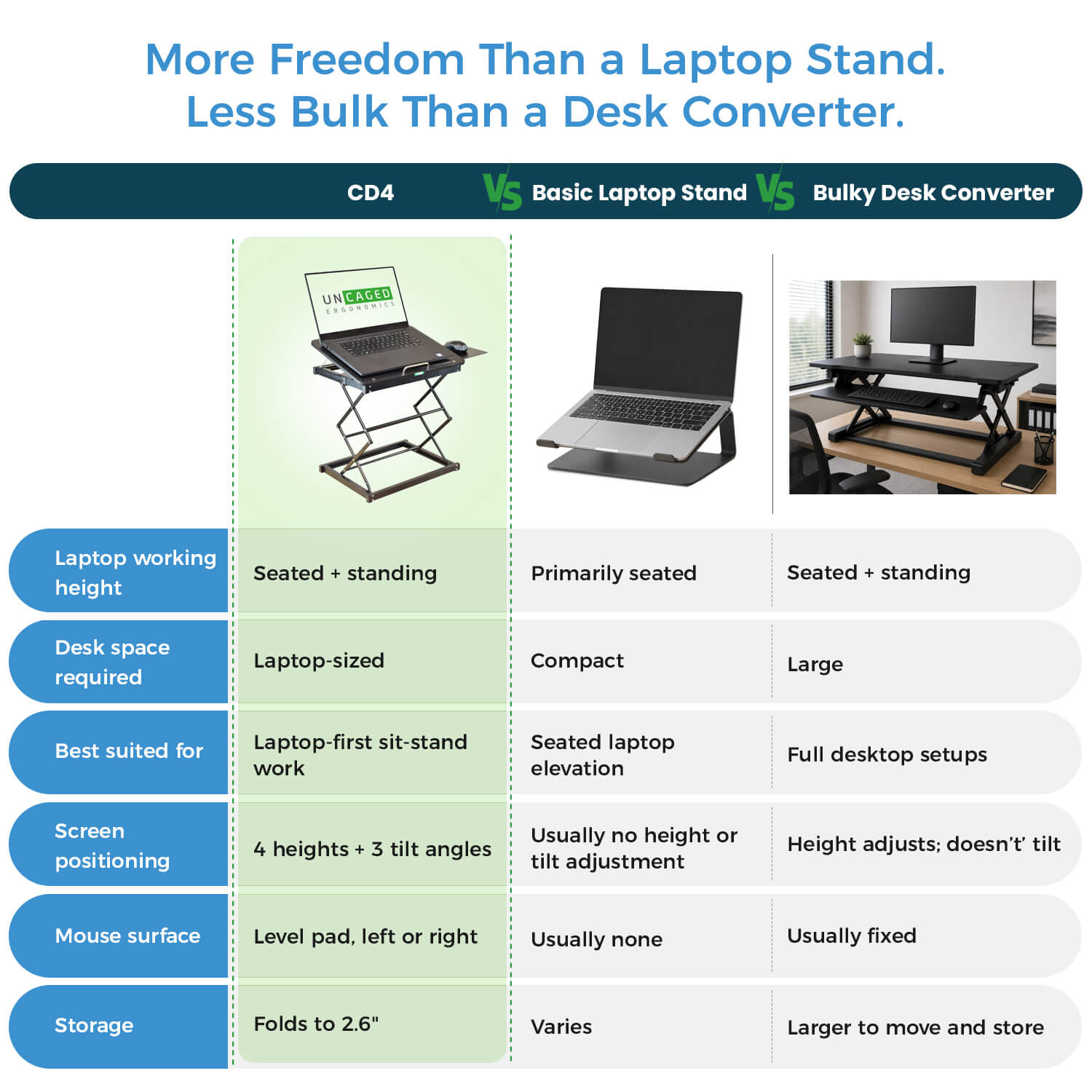
Why CD4: it gives laptop-first users a compact path from sitting to standing without replacing the desk, adding a separate keyboard, or committing to a large converter.
See CD4 in action
Low when you want to sit. High when you want to stand.
Frequently asked questions
CD4 questions
Can I work directly on my laptop while standing?
Yes. CD4 is designed specifically to raise a laptop for seated or standing work on an existing desk.
What height settings does CD4 have?
CD4 provides four fixed working heights: 2.6, 8.75, 15.25, and 18.6 in.
Can I change the laptop angle?
Yes. The laptop platform can be set to 0°, 16°, or 25°.
Can the mouse pad go on either side?
Yes. The included level mouse pad can be mounted on either the right or left side.
How much weight can CD4 support?
CD4 supports up to 13 lb.
Does it require installation?
No. CD4 sits on the existing work surface and requires no permanent installation.
Can it be stored flat?
Yes. CD4 folds flat for easier storage when it is not being used.
Delivery and returns follow our Shipping Policy and 30-day Return & Refund Policy. Ask us to confirm any separate manufacturer warranty for the exact item.
| Weight | 4.082 kg |
|---|---|
| Original brand | Uncaged Ergonomics |
| Materials | CD4 uses a steel and engineered-wood structure to support up to 13 lb. There is nothing to plug in or install. Set the height and angle you want, work, then collapse the stand when you need the desk clear again.; Steel + engineered-wood construction. |
| Working heights | 2.6, 8.75, 15.25, and 18.6 in |
| Laptop platform angles | 0°, 16°, and 25° |
| Mouse pad | Included; mounts on the right or left |
| Mouse surface | Remains level while the laptop platform is tilted |
| Maximum load | Up to 13 lb |
| Construction | Steel + engineered wood |
| Installation | None required |
| Storage | Folds flat |
Compare desk clearance, mount pattern, stated capacity and the equipment dimensions you need to support.
Check the exact fitting pattern and hardware; not every stand or arm supports every screen or desk.
Use and care for this item according to its supplied manufacturer instructions. Confirm the exact model, dimensions and selected options above; features not stated for this product are not promised.
Compare desk clearance, mount pattern, stated capacity and the equipment dimensions you need to support.
Check the exact fitting pattern and hardware; not every stand or arm supports every screen or desk.
Available options are listed on each product. Select the exact option before adding it to your cart; not every item offers every color or size.
Contact [email protected] with the product name and selected option.
Free standard U.S. shipping. No minimum order. Estimated 5–8 business days total.
Shipping policyContact us within 30 days after delivery for return instructions.
Returns & refunds